> For the complete documentation index, see [llms.txt](https://tech.x2bee.com/llms.txt). Markdown versions of documentation pages are available by appending `.md` to page URLs; this page is available as [Markdown](https://tech.x2bee.com/dev-guide/pjt-prepare/undefined/ci-cd.md).

# CI/CD 구성 설계

## Kubernetes App

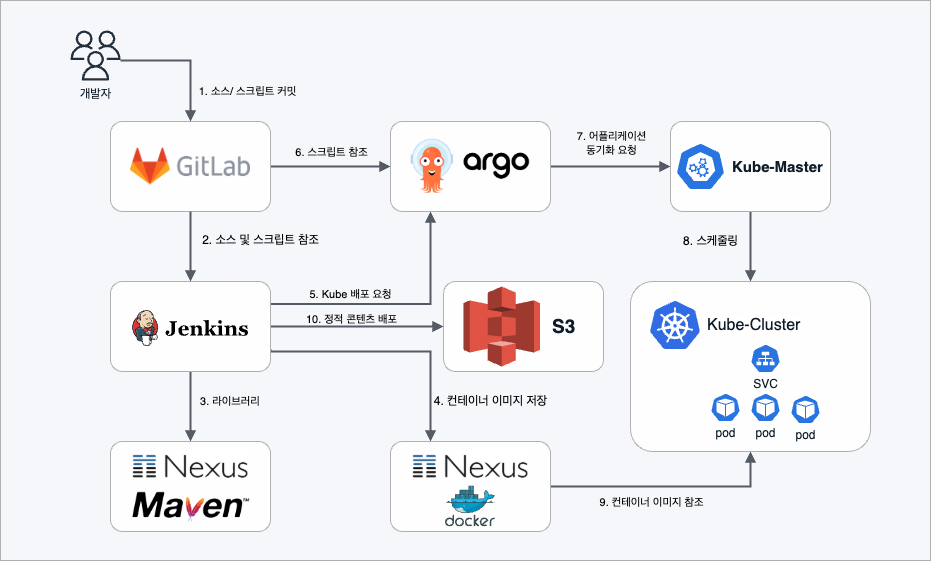
<figure><img src="/files/MMoZHNNtgGUs91asagXo" alt=""><figcaption></figcaption></figure>

<table data-header-hidden><thead><tr><th width="215.111083984375"></th><th></th></tr></thead><tbody><tr><td><strong>리소스 구성</strong></td><td><strong>정보</strong></td></tr><tr><td><strong>소스/스크립트 커밋</strong></td><td>개발자는 개발 완료된 소스를 Gitlab 저장소에 commit</td></tr><tr><td><strong>소스 및 스크립트 참조</strong></td><td>Jenkins는 개발 완료된 소스를 Gitlab으로부터 pull</td></tr><tr><td><strong>라이브러리 참조</strong></td><td>maven 빌드 진행 중 필요한 라이브러리는 nexus에서 참조</td></tr><tr><td><strong>컨테이너 이미지 저장</strong></td><td>빌드 완료되면 docker 이미지를 생성해서 Nexus 저장소에 이미지를 저장</td></tr><tr><td><strong>배포 요청</strong></td><td>ArgoCD에 배포 요청</td></tr><tr><td><strong>스크립트 참조</strong></td><td>ArgoCD는 배포 스크립트를 Gitlab에서 pull 하고 스트립트 내용을 Kubernetes에 전달</td></tr><tr><td><strong>컨테이너 동기화 요청</strong></td><td>개발자는 개발 완료된 소스를 Gitlab 저장소에 commit</td></tr><tr><td><strong>스케줄링</strong></td><td>해당 Deploy를 수행할 Worker Node 지정</td></tr><tr><td><strong>어플리케이션 이미지 참조</strong></td><td>Nexus에 저장된 docker 이미지를 받아서 Deploy</td></tr><tr><td><strong>정적 콘텐츠 배포</strong></td><td>어플리케이션에 포함된 정적 콘텐츠는 S3로 배포</td></tr></tbody></table>

## CI / CD 환경

<figure><img src="/files/xrFz7kjt6wcKiDlAuiiY" alt=""><figcaption></figcaption></figure>

{% stepper %}
{% step %}

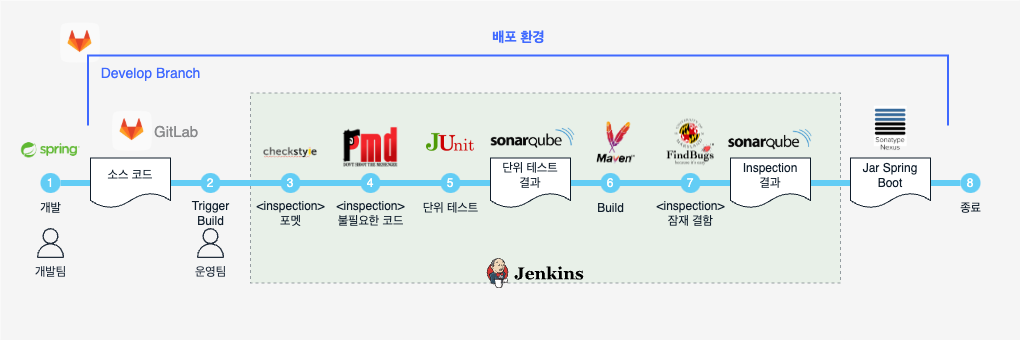
### 개발 / Push

개발팀이 IDE(STS4)에서 Source Coding을 한 이후 Gitlab 서버에 Push

* Source Coding
* 단위 테스트(JUnit4) 작성 및 수행
* Code Inspection(CheckStyle, PMD, FindBugs) 수행
  {% endstep %}

{% step %}

### 빌드 트리거 설정 및 실행

운영팀이 환경이나 상태를 고려하여 Jenkins의 Build trigger 조건 설정 및 실행

* 수동 실행 / 주기적 실행 / 다른 프로젝트 성공 시에 실행 / Gitlab Push Event를 감지하여 실행
  {% endstep %}

{% step %}

### Inspection — CheckStyle

코딩 포맷 검사 수행 (실패 시 다음 단계 진행 가능 여부는 설정에 따름)

* JAVA 기본 문법에 부합하는지 검사
* 프로젝트의 Coding Style Guide를 준수하고 있는지 검사
  {% endstep %}

{% step %}

### Inspection — PMD

불필요한 코드에 대한 검사 수행 (실패 시 다음 단계 진행 가능 여부는 설정에 따름)

* 사용되지 않는 변수나 함수에 대한 검사
  {% endstep %}

{% step %}

### 단위 테스트

단위 테스트 수행 (단위 테스트가 성공한 경우에만 다음 단계로 진행 가능)

* JUnit 테스트 수행
* 단위 테스트를 성공한 경우 Code Coverage 정보를 생성
  {% endstep %}

{% step %}

### Maven Build 및 아티팩트 저장

Maven Build를 통한 Spring boot jar를 생성하고 Nexus에 저장
{% endstep %}

{% step %}

### Inspection — FindBugs

오류 발생 가능한 부분에 대한 검사 수행 (실패 시 다음 단계 진행 가능 여부는 설정에 따름)

* 런타임에서 오류가 발생될 가능성이 있는 부분에 대한 검사 (ex: NullPointer)
  {% endstep %}
  {% endstepper %}

###


---

# Agent Instructions
This documentation is published with GitBook. GitBook is the documentation platform designed so that both humans and AI agents can read, navigate, and reason over technical content effectively. Learn more at gitbook.com.

## Querying This Documentation
If you need additional information that is not directly available in this page, you can query the documentation dynamically by asking a question.

Perform an HTTP GET request on the current page URL with the `ask` query parameter:

```
GET https://tech.x2bee.com/dev-guide/pjt-prepare/undefined/ci-cd.md?ask=<question>
```

The question should be specific, self-contained, and written in natural language.
The response will contain a direct answer to the question and relevant excerpts and sources from the documentation.

Use this mechanism when the answer is not explicitly present in the current page, you need clarification or additional context, or you want to retrieve related documentation sections.