> For the complete documentation index, see [llms.txt](https://tech.x2bee.com/llms.txt). Markdown versions of documentation pages are available by appending `.md` to page URLs; this page is available as [Markdown](https://tech.x2bee.com/dev-guide/developer-guide-en/pjt-prepare/publish-your-docs/batch-development-guide.md).

# Batch Development Guide

This document explains the X2BEE batch system configuration and Spring Boot Batch.

First, it explains how to write Cronicle scheduler jobs and the source code writing procedure, and based on this, provides a list of sample programs that perform simple batch tasks.

***

## X2BEE Batch System Configuration

Below is the overall configuration diagram of the batch system.

<figure><img src="https://200425-files.gitbook.io/~/files/v0/b/gitbook-x-prod.appspot.com/o/spaces%2FVEZx3rsZsIv89GPS3d2J%2Fuploads%2F3okEOyIrmroYISgG5tET%2F%E1%84%87%E1%85%A2%E1%84%8E%E1%85%B5%20%E1%84%89%E1%85%B5%E1%84%89%E1%85%B3%E1%84%90%E1%85%A6%E1%86%B7%20%E1%84%80%E1%85%AE%E1%84%89%E1%85%A5%E1%86%BC.png?alt=media&#x26;token=acfdd46c-0aef-4bf6-a4f3-b4ef3fd13916" alt=""><figcaption></figcaption></figure>

<table><thead><tr><th width="136">Category</th><th>Description</th></tr></thead><tbody><tr><td>Batch Service</td><td>A program that performs batch tasks. Its functions can be executed on a schedule set by the scheduler, or run immediately. Its main job is to look up data from a data store, process it, and save it back to the data store. It is implemented using Spring Batch, and runs as a web service so that batch jobs can be triggered via HTTP requests.</td></tr><tr><td>Scheduler</td><td>Registers and manages batch jobs and their execution cycles. When the execution cycle is reached, it sends an HTTP request to the batch service to run the batch job, and also provides an immediate-execution feature as needed. It logs execution results and provides execution result statistics through a UI. Uses open-source software.</td></tr><tr><td>BO Batch Management</td><td>Implements more detailed batch management features as a custom feature in the BO system, as needed. Provides data processing, statistics, and immediate-stop functionality, among others.</td></tr><tr><td>Data Store</td><td>There is no restriction on the target data; DB, File, S3, Queue, and so on can be used.</td></tr></tbody></table>

***

## Spring Boot Batch Explanation

The batch service is developed using Spring Batch.

Spring Batch provides reusable core functionality needed to process large volumes of records, such as logging/tracing, transaction management, job processing statistics, job restart, skip, and resource management. It also provides advanced techniques and features to effectively perform high-performance batch jobs by leveraging optimization and partitioning techniques.

### Spring Batch Program Structure

The Spring Batch program structure is divided into Tasklet-based and Chunk-based approaches.

**Chunk-based**

* A method that reads and processes a fixed amount of records (a Chunk) at a time.
* Since transactions are performed per chunk, only that chunk is rolled back on failure.
* It is recommended to match the paging size with the commit interval (Chunk Size).
* Usage example: bulk data change tasks

Key concepts:

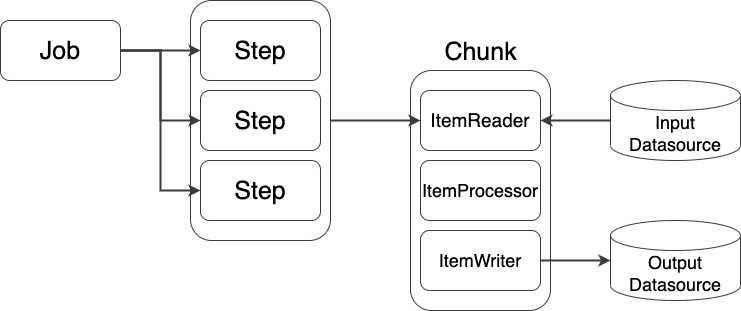
* Job, Step: The minimum unit of work. One Job consists of one or more Steps.
* Chunk: The transaction management unit.
* reader/processor/writer: Components that read/process/save data

<figure><img src="https://200425-files.gitbook.io/~/files/v0/b/gitbook-x-prod.appspot.com/o/spaces%2FVEZx3rsZsIv89GPS3d2J%2Fuploads%2FPPqaiYVeB8JLk0hcS99a%2Fspring%20batch.png?alt=media&#x26;token=72adcf06-c665-4bce-9e75-2122f9009ba7" alt=""><figcaption></figcaption></figure>

Tasklet-based

* A method that performs a single task. It performs the job by repeatedly calling the execute method.
* Used for initialization, running stored procedures, sending notifications, and so on.
* Simple batches can be easily implemented as a Tasklet, but bulk processing can become complex.

<figure><img src="https://200425-files.gitbook.io/~/files/v0/b/gitbook-x-prod.appspot.com/o/spaces%2FVEZx3rsZsIv89GPS3d2J%2Fuploads%2FpTFir8T3aQddwhcR9cAa%2Fspring%20batch(Tasklet).png?alt=media&#x26;token=30b086d0-f83f-419a-b209-7fae182a5fbf" alt=""><figcaption></figcaption></figure>

***

## Cronicle Explanation

Cronicle is a multi-server job scheduler and executor with a web-based front-end UI. It handles scheduled jobs, recurring jobs, and on-demand jobs across multiple slave servers, with real-time statistics and a live log viewer.

Feature summary:

* Single or multi-server setup
* Automatic failover to a backup server
* Automatic discovery of nearby servers
* Live log viewer
* Schedule events across various time zones
* Event queue management (optional)
* CPU and memory usage tracking
* Historical statistics and performance graphs
* Webhook support
* REST API for scheduling and running events

### Writing a Cronicle Event

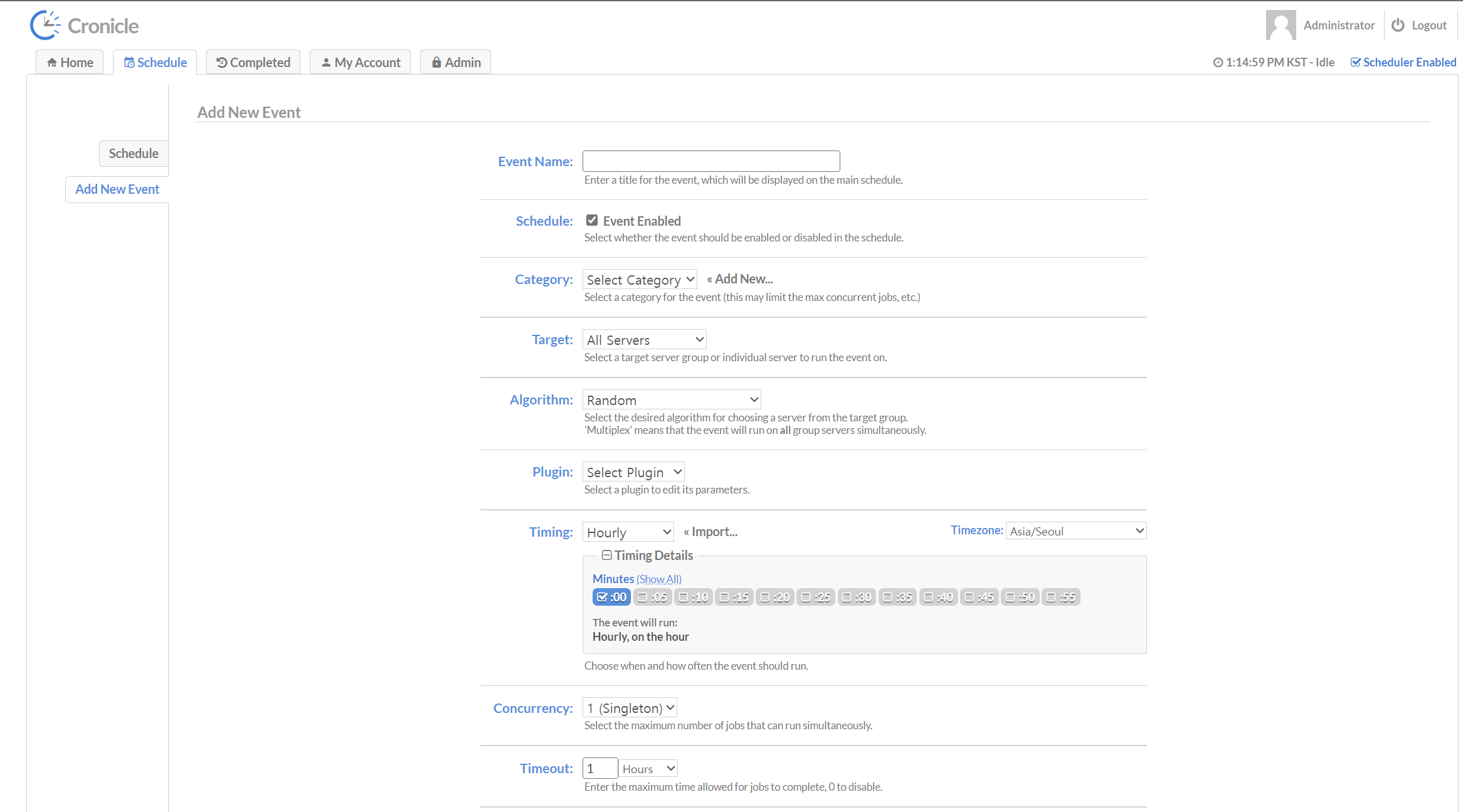
After logging in, create an event via Add Event at the bottom of the Schedule tab.

<figure><img src="https://200425-files.gitbook.io/~/files/v0/b/gitbook-x-prod.appspot.com/o/spaces%2FVEZx3rsZsIv89GPS3d2J%2Fuploads%2FU46CRYUB7Y6UAAlcQvIO%2Fimage-20230908-041509.png?alt=media&#x26;token=58d991df-2ed6-4d90-aecd-5675a3bd7b84" alt=""><figcaption></figcaption></figure>

Key attributes:

* Event Name: The name of the event
* Category: The category of the event
* Plugin: The plugin to be run
* Target: The target server to run on
* Timing: The execution cycle (daily, hourly, etc.)

<figure><img src="https://200425-files.gitbook.io/~/files/v0/b/gitbook-x-prod.appspot.com/o/spaces%2FVEZx3rsZsIv89GPS3d2J%2Fuploads%2FbECyAQDu7QEQtwjy0W5V%2Fimage-20230908-042741.png?alt=media&#x26;token=2a1b3f87-c1c1-4ba8-96c3-bde8a863b1e3" alt=""><figcaption></figcaption></figure>

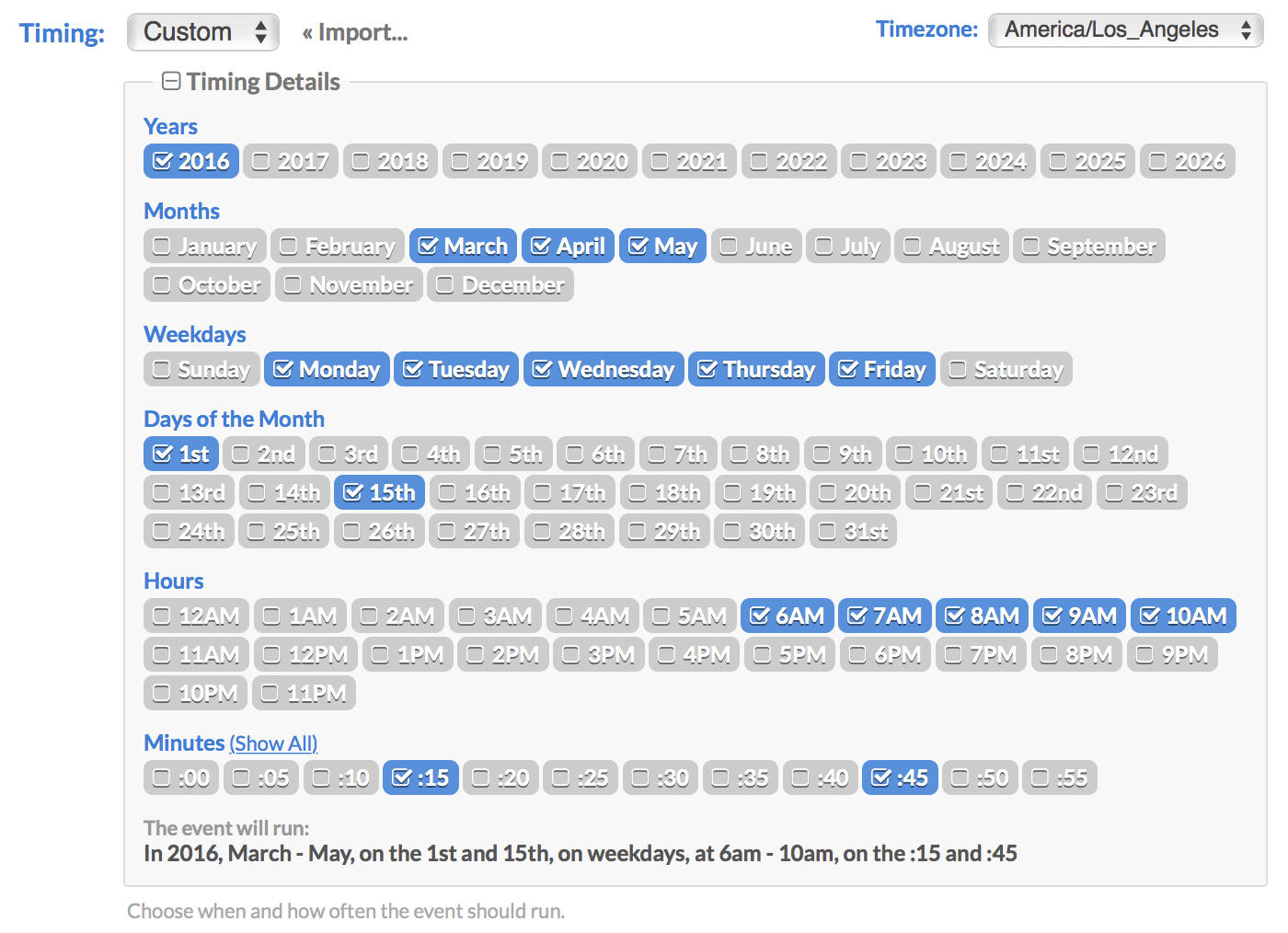
Timing supports various date/time schedules using a visual multi-select widget. To use a Crontab configuration, you can enter it via the \[ Import… ] link.

***

## Writing Controllers

Used to launch batch Jobs via HTTP requests. Using the common Controller (BatchJobController) means you don't need to write a separate controller. Write a controller only when a separate feature is needed.

### Class Annotations

Use the following annotations at the class level.

<table><thead><tr><th width="250.6666259765625">Annotation</th><th>Description</th></tr></thead><tbody><tr><td>@RestController</td><td>Indicates a REST controller (serves the role of @ResponseBody + @Controller)</td></tr><tr><td>@RequestMapping</td><td>Specifies the common URI at the controller class level</td></tr><tr><td>@Slf4j</td><td>lombok log annotation</td></tr><tr><td>@RequiredArgsConstructor</td><td>lombok annotation for convenient constructor injection</td></tr></tbody></table>

Example:

```java
@RestController
@RequestMapping("/samples")
@Slf4j
@RequiredArgsConstructor
public class SampleParamJobController { ... }
```

### Mapping URI Format

Format of the @RequestMapping path parameter: /batch/\<mbod,gddp>/\<resource-name-plural>/

* /batch/\<mbod,gddp>: specified as the context-path (not specified in the program)
* resource-name-plural: specified at the class-level @RequestMapping
* batch Job name: format that prefixes the Job name with the resource name

e.g.:

* context-path: /batch/gddp
* Class-level RequestMapping: @RequestMapping("/categories")
* Individual mapping examples:
  * @GetMapping("/categoryRankPopularJob")
  * @GetMapping("/categoryRankPopularGoodsJob")

### Method Parameter Annotations

| Annotation    | Description                                       |
| ------------- | ------------------------------------------------- |
| @PathVariable | JobName uses the PathVariable format              |
| @RequestParam | Parameters use the QueryString or FormData method |

Example signature:

```java
@GetMapping("/{jobName}")
public String sampleJobs(@PathVariable String jobName,
                         @RequestParam MultiValueMap<String, String> parameters) throws Exception { ... }
```

### Basic Source Code (Example)

```java
public class SampleParamJobController {
    private final JobLauncher jobLauncher;
    private final BatchCommonService batchCommonService;
    // job 선언, DI
    private final Job sampleParamJob;

    @GetMapping("/sampleParamJob")
    public String sampleParamJob(@RequestParam MultiValueMap<String, String> parameters) throws Exception {
        // 파라미터 준비 + increment(중복실행허용)
        JobParameters jobParameters = batchCommonService.setIncrementer(sampleParamJob);
        jobParameters = new JobParametersBuilder(jobParameters)
            .addString("sampleParam", parameters.getFirst("sampleParam"))
            .toJobParameters();

        // 실행
        JobExecution jobExecution = jobLauncher.run(sampleParamJob, jobParameters);
        Log.info("Batch job has been invoked: {}", jobExecution);

        // 실행성공
        return "Batch job has been invoked";
    }
}
```

Below is a summary of the key steps in the example above, organized as a stepper.

{% stepper %}
{% step %}

### Declaring the Job Member and DI

* Declare the Job as a class member and handle dependency injection (DI).
  {% endstep %}

{% step %}

### Allowing Duplicate Execution and Preparing Parameters

* Manage duplicate execution via an incrementer.
* Add the required parameters using JobParametersBuilder.
  {% endstep %}

{% step %}

### Running the Job

* Run the Job with JobLauncher.run(job, jobParameters).
* Check the execution result in the Spring Batch repository.
  {% endstep %}
  {% endstepper %}

### Method Return Value

The controller's return value is a simple String. It only returns the call result; the detailed execution result can be checked in the Spring Batch repository.

***

## Writing the Job Configuration Class

A Job Configuration class is a class that defines beans such as the Job, Step, and Reader/Writer/Processor in Spring Batch.

Summary:

* Supported on Java 17 and above
* The legacy StepBuilderFactory and JobBuilderFactory are no longer recommended. Instead, JobRepository and PlatformTransactionManager are used explicitly.
* @EnableBatchProcessing is no longer required (not recommended)

The example is written using the CompositeItemWriter approach.

### Class-Level Annotations

| Annotation               | Description                                   |
| ------------------------ | --------------------------------------------- |
| @Configuration           | Used to declare beans such as Job, Step, etc. |
| @Slf4j                   | lombok log                                    |
| @RequiredArgsConstructor | lombok convenient constructor injection       |

Example:

```java
@Configuration
@RequiredArgsConstructor
@Slf4j
public class SimpleJobConfig {
    private final JobRepository jobRepository;
    private final PlatformTransactionManager transactionManager;
    ...
}
```

### Creating a Job (Example)

```java
@Bean
public Job simpleComposItemWriterJob() {
    return new JobBuilder("simpleComposItemWriterJob", jobRepository)
        .start(simpleComposItemWriterStep()) // Step 설정
        .incrementer(new UniqueRunIdIncrementer()) // 중복실행허용
        .build();
}
```

Explanation:

* Generally composed of one Step, with a nextStep added if needed
* Duplicate execution can be managed via incrementer
* JobParametersValidator can be used to validate execution parameters

### Creating a Step (Chunk-Based Example)

```java
@Bean
public Step simpleComposItemWriterStep() {
    return new StepBuilder("simpleComposItemWriterStep", jobRepository)
        .<SampleRequest, SampleRequest>chunk(CHUNK_SIZE, transactionManager)
        .reader(simpleItemReader())
        // .processor(...)
        .writer(simpleCompositeItemWriter())
        .build();
}
```

* reader: looks up data
* processor: processes data as needed (optional)
* writer: saves the processed data (Insert/Update/Send, etc.)
* Use chunk and transactionManager to specify the transaction unit

Example of a chunk-based reader/processor/writer:

```java
@Bean
@StepScope
public ItemReader<SampleRequest> simpleItemReader() {
    return new ListItemReader<>(batSampleCompositeService.reader());
}

@Bean
public ItemWriter<SampleRequest> simpleCompositeItemWriter() {
    CompositeItemWriter<SampleRequest> compositeItemWriter = new CompositeItemWriter<>();
    compositeItemWriter.setDelegates(Arrays.asList(simpleUpdateService() /*, sampleUpdateService2() */));
    return compositeItemWriter;
}

@Bean
public ItemWriter<SampleRequest> simpleUpdateService() {
    return sampleList -> sampleList.forEach(batSampleCompositeService::writer2);
}
```

Example of a Tasklet-based Step:

```java
@Bean
@JobScope
public Step sampleParamStep() {
    return new StepBuilder("sampleParamStep", jobRepository)
        .start(sampleParamTasklet(null))
        .incrementer(new UniqueRunIdIncrementer())
        .build();
}

@Bean
@JobScope
public SampleParamTasklet sampleParamTasklet(@Value("#{jobParameters[sampleParam]}") String sampleParam) {
    return new SampleParamTasklet(sampleParam);
}
```

Tasklet implementation example:

```java
public class SampleParamTasklet implements Tasklet {
    @Autowired
    private SampleService sampleService;
    private String sampleParam;

    public SampleParamTasklet(String sampleParam) {
        this.sampleParam = sampleParam;
    }

    @Override
    public RepeatStatus execute(StepContribution contribution, ChunkContext chunkContext) throws Exception {
        List<Sample> list = sampleService.getSampleList(new Sample());
        for (Sample sample : list) {
            Log.info("!!!!!! executed tasklet !!!!!!: {}, sampleParam: {}", sample, sampleParam);
        }
        return RepeatStatus.FINISHED;
    }
}
```

***

## Sample Program List

List and description of samples included in the sample package of the batch project (gddp):

| Batch Program Name        | File                                | Description                                                                                    |
| ------------------------- | ----------------------------------- | ---------------------------------------------------------------------------------------------- |
| simpleComposItemWriterJob | SimpleJobConfig.java                | Sample with a 2-stage reader/writer configuration using CompositeItemWriter, processor omitted |
| sampleFileJob             | SampleFileJobConfig.java            | Sample of reading a CSV file using FlatFileItemReader                                          |
| sampleCompositeWriterJob  | SampleCompositeWriterJobConfig.java | Sample of handling composite tasks such as Insert/Update/Send using CompositeItemWriter        |
| sampleMyBatisCursorJob    | SampleMyBatisCursorJobConfig.java   | Sample using MyBatis Cursor Reader and MyBatis Batch Writer (includes a ParameterConverter)    |
| sampleJdbcJob             | SampleJdbcJob.java                  | Sample using JdbcCursorItemReaderBuilder and JdbcBatchItemWriterBuilder                        |
| sampleJdbcPagingJob       | SampleJdbcPagingConfig.java         | Sample using JdbcPagingItemReaderBuilder                                                       |

Brief description of some samples:

simpleComposItemWriterJob

* Uses CompositeItemWriter to compose multiple writers as Delegates.

sampleFileJob

* Reads a CSV file with FlatFileItemReader.

```java
@Bean
@StepScope
public FlatFileItemReader<SampleFileRequest> sampleFileReader() {
    String[] names = new String[] {"name", "description"};
    return new FlatFileItemReaderBuilder<SampleFileRequest>()
        .name("sampleFileRequest")
        .resource(new ClassPathResource("/csv/sample_data.csv"))
        .linesToSkip(1)
        .targetType(SampleFileRequest.class)
        .delimited().delimiter(",")
        .names(names)
        .build();
}
```

sampleCompositeWriterJob

* A sample that includes a Processor to convert from the Input type (SampleRequest) to the Output type (SampleResponse).

sampleMyBatisCursorJob

* Example of using MyBatis Cursor Reader and MyBatis Batch Writer:

```java
@Bean
public MyBatisCursorItemReader<SampleRequest> sampleMyBatisCursorItemReader() {
    Map<String, Object> parameterValues = new HashMap<>();
    return new MyBatisCursorItemReaderBuilder<SampleRequest>()
        .sqlSessionFactory(displayRodbSqlSessionFactory)
        .queryId("com.x2bee.batch.gddp.app.repository.displayrodb.sample.BatSampleMapper.selectSampleList")
        .parameterValues(parameterValues)
        .build();
}

@Bean
public ItemWriter<SampleRequest> sampleMyBatisBatchItemWriter() {
    return new MyBatisBatchItemWriterBuilder<SampleRequest>()
        .sqlSessionFactory(displayRwdbSqlSessionFactory)
        .assertUpdates(false)
        .itemToParameterConverter(item -> {
            Map<String, Object> parameter = new HashMap<>();
            parameter.put("sysModrId", "BATCH");
            parameter.put("name", item.getName());
            return parameter;
        })
        .statementId("com.x2bee.batch.gddp.app.repository.displayrwdb.sample.BatSampleTrxMapper.updateSample")
        .build();
}
```

sampleJdbcJob (JdbcCursor, JdbcBatch example)

* Uses JdbcCursorItemReaderBuilder and JdbcBatchItemWriterBuilder. Retrieves SQL from BoundSql and configures a PreparedStatementSetter, and so on.

sampleJdbcPagingJob

* Example of paging processing using JdbcPagingItemReaderBuilder and SqlPagingQueryProviderFactoryBean.

***

## Readers for Optimizing Spring Boot Batch Performance

Readers should be configured to read data efficiently and optimize processing speed. Below are the key readers and their characteristics.

* JdbcPagingItemReader
  * Reads data page by page, efficient in memory usage
  * Performance can degrade the further along it goes
* JdbcCursorItemReader
  * Cursor-based; reads data as needed
  * Memory-efficient and suitable for processing large volumes of data
* MyBatisPagingItemReader
  * A paging reader using MyBatis
* MyBatisCursorItemReader
  * An integrated reader combining MyBatis and a cursor-based approach

### Custom Reader: QuerydslNoOffsetPagingItemReader

* Uses QueryDSL to handle paging without an offset (Zero-Offset)
* Advantages: resolves offset performance issues, fast paging
* Disadvantages: not officially supported by Spring Batch, not recommended for complex queries

Example (summary):

```java
@Bean
@StepScope
public QuerydslNoOffsetPagingItemReader<QuerydslEntity> sampleQuerydslNoOffsetPaginItemReader(@Value("#{jobParameters[strDtm]}") String strDtm) {
    DateTimeFormatter formatter = DateTimeFormatter.ofPattern("yyyyMMdd HH:mm:ss");
    LocalDateTime dateTime = LocalDateTime.parse(strDtm, formatter);

    QuerydslNoOffsetStringOptions<QuerydslEntity> options =
        new QuerydslNoOffsetStringOptions<>(querydslEntity.mbrNo, QuerydslReaderExpression.ASC);

    return new QuerydslNoOffsetPagingItemReader<>(entityManagerFactory, CHUNK_SIZE, options, queryFactory ->
        queryFactory.selectFrom(querydslEntity)
            .where(querydslEntity.mbrJoinDtm.after(dateTime))
    );
}
```

***

## Actual Examples and Tests (Summary)

Test targets:

* Total data count: 200k, 700k, 1,000k records
* Chunk size: 1000 (the same across all tests)
* Test environment: 12th Gen Intel Core i7-1260P / LPDDR5 16GB
* All ItemWriters equally used either MyBatisBatchItemWriter or JdbcBatchItemWriter

Summary of test results (see the detailed table in the original document):

* Tasklet-based: showed the fastest performance, but had the highest memory usage (possible OOM)
* Chunk-based: lower memory usage than Tasklet (per-chunk transactions)
* MyBatisCursor / JdbcCursor: an initial Cursor Open cost exists, but good processing performance afterward
* JdbcPaging: fast at first, but slows down further along (due to increasing offset)
* QuerydslNoOffset: showed the best performance in testing (advantageous depending on conditions)

(The original document includes a detailed performance table.)

***

## Final Conclusion

Recommended combinations (summary):

| Reader / Writer                                       | Notes                                                                                                                                                                      |
| ----------------------------------------------------- | -------------------------------------------------------------------------------------------------------------------------------------------------------------------------- |
| MyBatisCursorItemReader / MybatisBatchItemWriter      | In general environments, MyBatis Cursor is fast. For saving, MybatisBatchItemWriter is recommended for Batch Insert/Update.                                                |
| MyBatisPagingItemReader / MybatisBatchItemWriter      | If paging can be configured to always query only the first page (offset 0), it uses less memory and is fast (useful depending on the business logic).                      |
| QueryDslZeroOffsetItemReader / MybatisBatchItemWriter | For a single table with a sequence-type PK, the QueryDSL-based Zero-Offset Reader shows very good performance. The downside is that the query must be changed to QueryDSL. |