> For the complete documentation index, see [llms.txt](https://tech.x2bee.com/llms.txt). Markdown versions of documentation pages are available by appending `.md` to page URLs; this page is available as [Markdown](https://tech.x2bee.com/dev-guide/dev-start/editor.md).
# 개발환경
## 개요
X2BEE의 개발을 위한 안정적인 개발 환경을 구축하는 방법에 대해 설명합니다.
***
## 사용 라이브러리 정보
| 명칭 | 버전 | 용도 |
| ------------- | -------- | ------------------------------------------------ |
| Next.js | v16.2.11 | React 기반의 서버 사이드 렌더링(SSR) 및 정적 사이트 생성(SSG) 프레임워크 |
| React.js | v19.2.3 | 사용자 인터페이스 구축을 위한 JavaScript 라이브러리 |
| Zustand | v5.0.3 | 간단하고 직관적인 전역 상태 관리 라이브러리 |
| TypeScript | v6.0.3 | 정적 타입을 지원하는 JavaScript의 상위 집합 언어 |
| TailwindCSS | v4.1.16 | 유틸리티 퍼스트 CSS 프레임워크로 빠르고 일관된 UI 스타일링 지원 |
| ESLint | v8.57.1 | 코드 품질 향상과 일관성 유지를 위한 JavaScript/TypeScript 린터 |
| Prettier | v3.3.3 | 코드 자동 포매팅 도구로 스타일 일관성 유지에 사용 |
| @mui/material | 6.0.1 | Material-UI를 이용한 UI 컴포넌트 라이브러리 |
## 프로젝트 패키지 구조
{% stepper %}
{% step %}
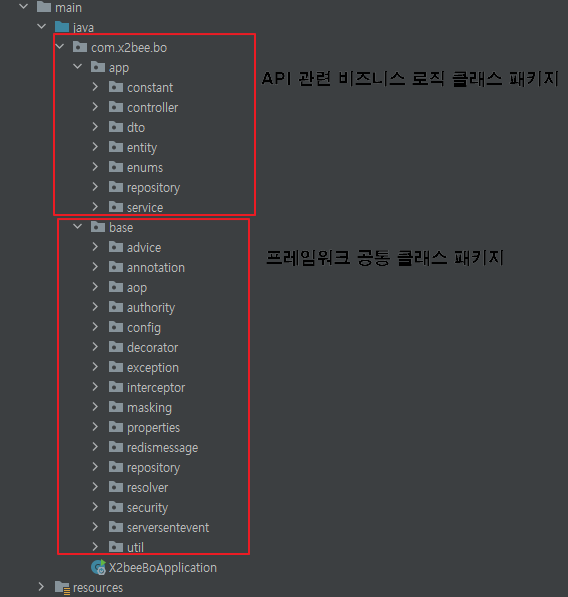
### src/main/java
* 프레임워크 공통 클래스 패키지: 프로젝트 관련 설정, 예외처리, DB관련 속성, 보안, 유틸 클래스 포함
* API 관련 비즈니스 로직 클래스 패키지: Controller, Service, Dao, Entity 클래스
{% endstep %}
{% step %}
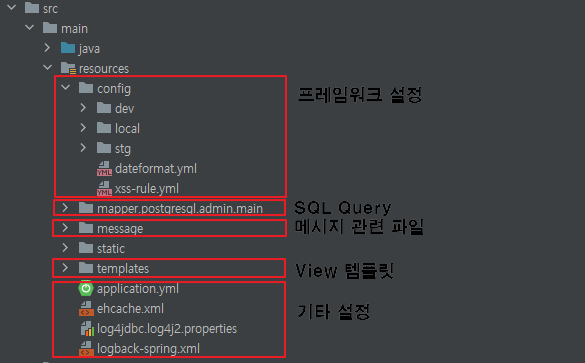
### src/main/resources
* 프레임워크 설정 패캐지: dev/local 별 datasource 설정, 로깅 설정, 기타 설정 파일
* API 관련 쿼리 패키지: 프로젝트 내에서 사용될 쿼리 파일
* View 템플릿 패키지: Front-end html 파일과 error html 파일
* 기타 설정 패키지: 프로젝트 전체 appliation.yml 파일 및 설정 파일
{% endstep %}
{% endstepper %}