# 알림함

다른 모듈에서의 업무 수행 후에 사용자에게 알림 메시지를 전송하고, 해당 알림을 마이페이지에서 확인할 수 있는 기능을 제공합니다.

***

## 주요 기능

* **알림 메시지 발송**
  * 특정 기능을 처리한 후 해당 작업이 완료되었다는 알림 메시지를 고객에게 발송합니다.
* **마이페이지 알림함**
  * 마이페이지 내에서 알림함 영역을 제공하며, 고객이 완료한 작업에 대한 알림 메시지를 확인할 수 있습니다.
* **알림 메시지 상세 조회**
  * 알림함에서 알림 메시지를 선택하면 해당 알림에 대한 상세 정보를 조회할 수 있습니다.
* **알림 메시지 관련 페이지로 이동**
  * 알림함에서 알림 메시지를 선택하면 등록된 URL로 이동하여 관련 작업에 대한 페이지로 이동합니다.

## 프로세스 정의

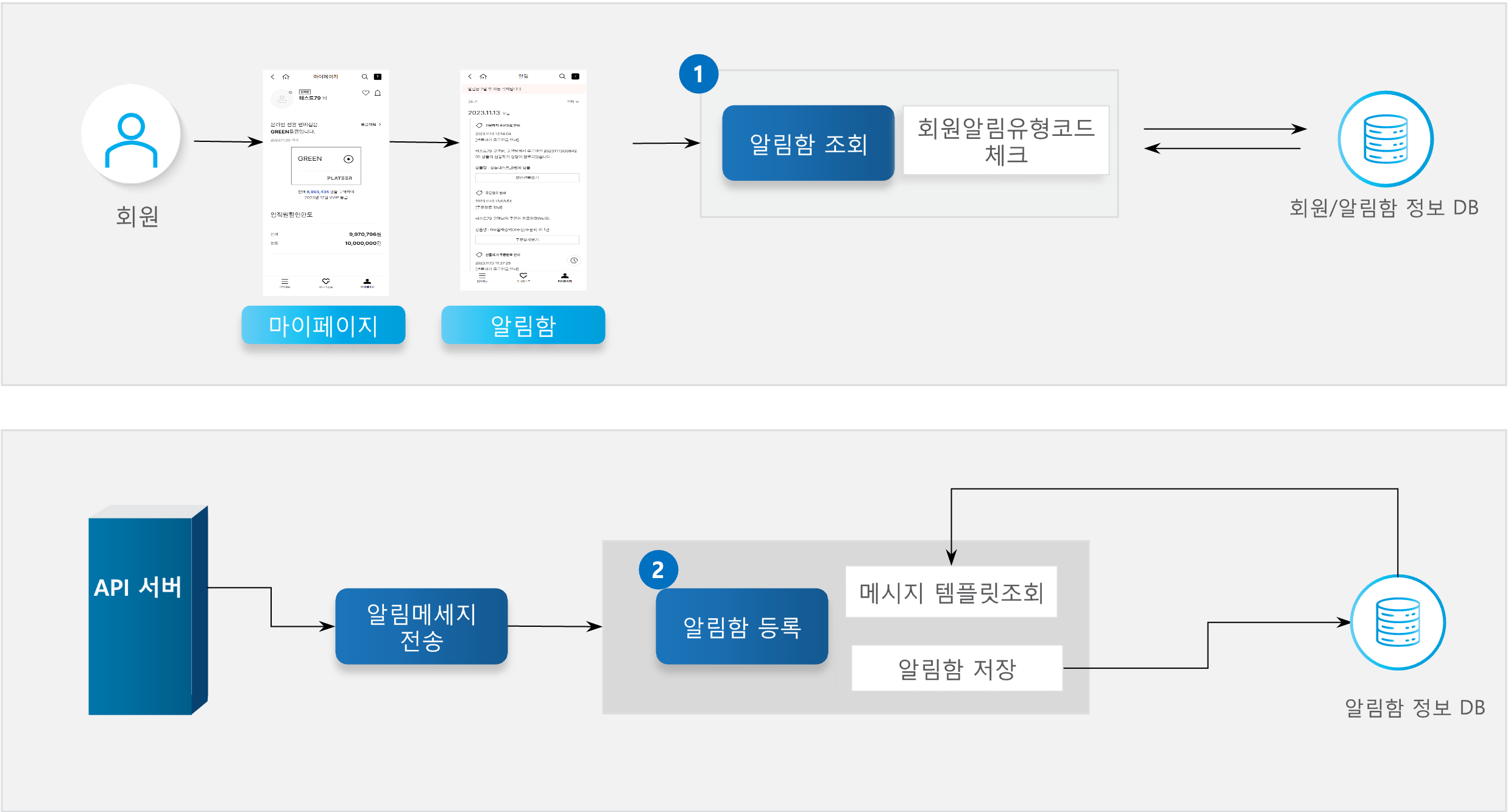
<figure><img src="/files/pqrVo0cBnshBaKlztt27" alt=""><figcaption></figcaption></figure>

{% stepper %}
{% step %}

### 알림함 조회

마이페이지에서 알림함 페이지에 들어가면 알림함을 조회합니다.\
파라미터 중 회원알림유형코드가 들어왔을 시 해당 코드에 해당하는 알림함 목록만 조회합니다.\
회원알림유형코드가 넘어오지 않을 시 회원에 대한 알림함 목록을 최신 순으로 조회합니다.
{% endstep %}

{% step %}

### 알림함 등록

특정 업무 처리 후 타 모듈에서 알림함 등록을 요청할 시 알림함을 등록합니다.\
요청한 알림함 템플릿에 버튼 정보가 존재하면 버튼 정보를 함께 저장합니다.\
저장된 알림함 정보는 마이페이지 > 알림함에서 확인할 수 있습니다.
{% endstep %}
{% endstepper %}

## API 기능 목록

<table><thead><tr><th width="110.111083984375">API</th><th width="292.3333740234375">설명</th><th width="93.5556640625">Server</th><th width="89.111083984375">메소드</th><th></th></tr></thead><tbody><tr><td>알림함 조회</td><td>회원의 알림함 목록을 조회합니다.</td><td>Member</td><td>GET</td><td><a href="http://api.x2bee.com/content?msa=member&#x26;depth=%EC%95%8C%EB%A6%BC%ED%95%A8&#x26;path=getNotiBoxList">🔗API 확인하기 ></a></td></tr><tr><td>알림함 등록</td><td>타 모듈에서 업무 처리 완료 후 알림함등록API 호출시 알림함 등록처리 기능을 제공합니다.</td><td>Member</td><td>POST</td><td><a href="http://api.x2bee.com/content?msa=member&#x26;depth=%EC%95%8C%EB%A6%BC%ED%95%A8&#x26;path=registerNotiBox">🔗API 확인하기 ></a></td></tr></tbody></table>

## 용어 정의

<table><thead><tr><th width="75.1112060546875">명칭</th><th>설명</th><th data-hidden>비고</th></tr></thead><tbody><tr><td>알림함</td><td>사용자에게 중요한 정보, 메시지, 알림 등을 저장하고 표시하는 공간을 가리키는 용어입니다</td><td></td></tr></tbody></table>

## 기타 참고사항

* 알림함 조회 시 파라미터로 회원알림유형코드(ME051)가 넘어오면 해당 회원알림유형코드(ME051)에 해당하는 알림함 목록만 조회합니다.
* 알림메시지 등록은 타모듈 api -> x2bee-api-common -> x2bee-api-member 순으로 api를 호출하게 됩니다.
* 7일 지난 알림함 내용은 배치에서 자동으로 삭제 처리 합니다.

---

# Agent Instructions: Querying This Documentation

If you need additional information that is not directly available in this page, you can query the documentation dynamically by asking a question.

Perform an HTTP GET request on the current page URL with the `ask` query parameter:

```
GET https://tech.x2bee.com/api-guide/store-front/member/undefined-7.md?ask=<question>
```

The question should be specific, self-contained, and written in natural language.
The response will contain a direct answer to the question and relevant excerpts and sources from the documentation.

Use this mechanism when the answer is not explicitly present in the current page, you need clarification or additional context, or you want to retrieve related documentation sections.
