> For the complete documentation index, see [llms.txt](https://tech.x2bee.com/llms.txt). Markdown versions of documentation pages are available by appending `.md` to page URLs; this page is available as [Markdown](https://tech.x2bee.com/api-guide/back-office/system-bo/undefined-3.md).

# 모니터링 관리

관리자 시스템의 다양한 이력 정보를 효율적으로 조회하고 관리하는 기능을 제공합니다. 배치 이력, 사용자의 접속 이력, 개인정보 열람 이력 등을 모니터링하여 시스템의 안정성과 사용자 활동을 파악할 수 있습니다.

***

## 주요 기능

* 배치 이력 및 상태 이력을 조회할 수 있습니다.
* 관리자 시스템 사용자의 이력을 조회합니다.
* 사용자가 조회한 개인정보에 대한 열람 이력을 조회합니다.

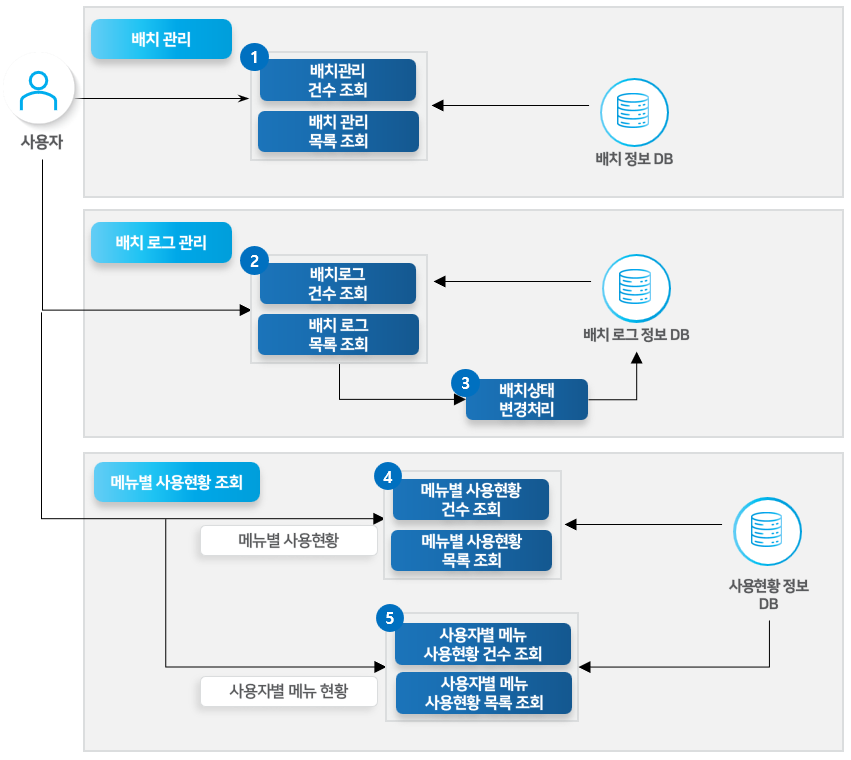
## 프로세스 정의 — 배치 및 메뉴별 사용현황 조회

관리자 시스템 내 배치 이력 및 사용자의 사용 이력을 조회할 수 있습니다.

<figure><img src="/files/knCdArRfoyJGIQtAmFGV" alt=""><figcaption></figcaption></figure>

{% stepper %}
{% step %}

### 배치 관리 목록 조회

선택한 조건에 맞는 배치 목록 및 건수를 볼 수 있습니다.
{% endstep %}

{% step %}

### 배치 로그 목록 조회

선택한 조건에 맞는 배치 로그 목록 및 건수를 볼 수 있습니다.

* 각 배치 프로그램 별 결과 이력을 볼 수 있습니다.
  {% endstep %}

{% step %}

### 배치상태 변경처리

각 배치 프로그램은 중복 실행이 안되기 때문에 진행 중인 것을 FAILED 처리 할 수 있습니다.
{% endstep %}

{% step %}

### 메뉴별 사용현황 목록 조회

조회조건에 따라 각 시스템(BO, CC, PO) 마다 메뉴 별 사용현황 건수, 목록을 조회할 수 있습니다.
{% endstep %}

{% step %}

### 사용자별 메뉴 사용현황 목록 조회

조회조건에 따라 각 시스템(BO, CC, PO) 마다 사용자별 메뉴 사용현황의 건수, 목록을 조회할 수 있습니다.
{% endstep %}
{% endstepper %}

***

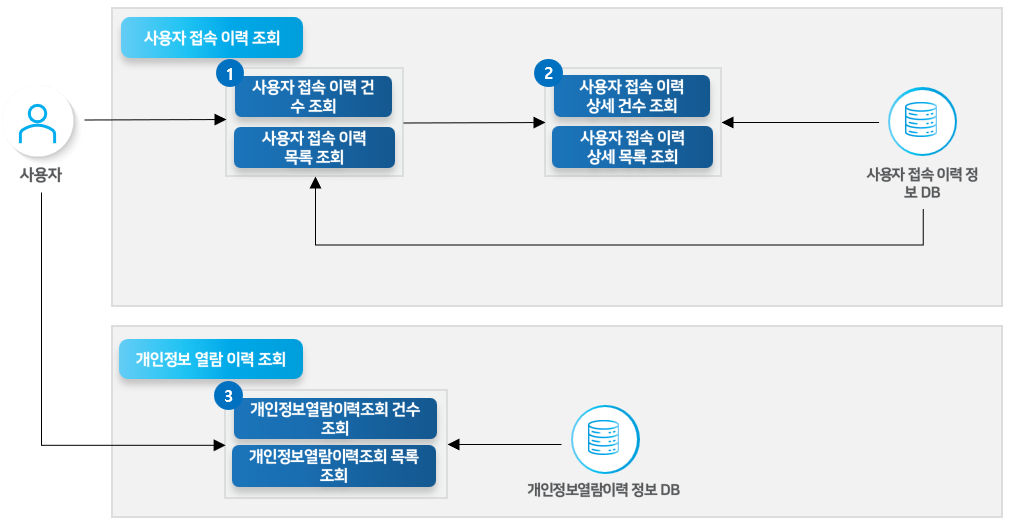
## 프로세스 정의 — 사용자 접속 및 개인정보 열람 이력 조회

관리자 시스템 내 사용자 접속 정보 이력 및 개인정보 열람 이력을 조회할 수 있습니다.

<figure><img src="/files/txGTtb5YU9C7C1Wu5euJ" alt=""><figcaption></figcaption></figure>

{% stepper %}
{% step %}

### 사용자 접속 이력 목록 조회

조회조건에 따라 시스템 사용자 별 로그인 건수, 목록을 조회할 수 있습니다.
{% endstep %}

{% step %}

### 사용자 접속 이력 상세 목록 조회

접속 이력 목록에서 선택한 사용자에 대한 상세 로그인 건수, 이력 목록을 볼 수 있습니다.
{% endstep %}

{% step %}

### 개인정보열람이력조회 목록 조회

각 사용자의 개인정보 열람 이력 건수, 목록을 조회할 수 있습니다. 사용자가 개인정보를 포함한 화면에서 열람사유를 입력할 시 열람사유를 함께 조회합니다.
{% endstep %}
{% endstepper %}

***

## API 기능 목록\_배치 관리

<table><thead><tr><th width="105.77783203125">API</th><th width="259">설명</th><th width="93.5555419921875" align="center">Server</th><th width="95.111083984375" align="center">메소드</th><th>비고</th></tr></thead><tbody><tr><td>배치 관리 목록 조회</td><td>배치의 목록을 조회합니다.</td><td align="center">BO</td><td align="center">GET</td><td><a href="https://apibo.x2bee.com/content?bo=system&#x26;depth=%EB%B0%B0%EC%B9%98%20%EA%B4%80%EB%A6%AC%20%EC%A1%B0%ED%9A%8C&#x26;path=getBatchList">🔗API 확인하기 ></a></td></tr><tr><td>배치 관리 건수 조회</td><td>배치의 목록 건수를 조회합니다.</td><td align="center">BO</td><td align="center">GET</td><td><a href="https://apibo.x2bee.com/content?bo=system&#x26;depth=%EB%B0%B0%EC%B9%98%20%EA%B4%80%EB%A6%AC%20%EC%A1%B0%ED%9A%8C&#x26;path=getBatchListCount">🔗API 확인하기 ></a></td></tr></tbody></table>

## API 기능 목록\_배치로그 조회

<table><thead><tr><th width="127.888916015625">API</th><th width="323.888916015625">설명</th><th width="93.5555419921875" align="center">Server</th><th width="92.4444580078125" align="center">메소드</th><th>비고</th></tr></thead><tbody><tr><td>배치로그 건수 조회</td><td>배치의 로그에 대한 건수를 조회합니다.</td><td align="center">BO</td><td align="center">GET</td><td><a href="https://apibo.x2bee.com/content?bo=system&#x26;depth=%EB%B0%B0%EC%B9%98%EB%A1%9C%EA%B7%B8%20%EC%A1%B0%ED%9A%8C&#x26;path=getBatchLogListCount">🔗API 확인하기 ></a></td></tr><tr><td>배치로그 목록 조회</td><td>배치의 로그에 대한 목록을 조회합니다.</td><td align="center">BO</td><td align="center">GET</td><td><a href="https://apibo.x2bee.com/content?bo=system&#x26;depth=%EB%B0%B0%EC%B9%98%EB%A1%9C%EA%B7%B8%20%EC%A1%B0%ED%9A%8C&#x26;path=getBatchList_1">🔗API 확인하기 ></a></td></tr><tr><td>배치상태 변경 처리</td><td>진행 중인 배치의 상태를 실패 처리합니다.</td><td align="center">BO</td><td align="center">POST</td><td><a href="https://apibo.x2bee.com/content?bo=system&#x26;depth=%EB%B0%B0%EC%B9%98%EB%A1%9C%EA%B7%B8%20%EC%A1%B0%ED%9A%8C&#x26;path=modifyBatchLogStatus">🔗API 확인하기 ></a></td></tr></tbody></table>

## API 기능 목록\_메뉴별 사용 현황 조회

<table><thead><tr><th width="145.6666259765625">API</th><th width="261.111083984375">설명</th><th width="92.4444580078125" align="center">Server</th><th width="90.22216796875" align="center">메소드</th><th>비고</th></tr></thead><tbody><tr><td>메뉴별 사용현황 건수 조회</td><td>메뉴별 사용현황에 대한 건수를 조회합니다.</td><td align="center">BO</td><td align="center">GET</td><td><a href="https://apibo.x2bee.com/content?bo=system&#x26;depth=%EB%A9%94%EB%89%B4%EB%B3%84%20%EC%82%AC%EC%9A%A9%ED%98%84%ED%99%A9%20%EC%A1%B0%ED%9A%8C&#x26;path=getMenuUseStatusListCount">🔗API 확인하기 ></a></td></tr><tr><td>메뉴별 사용현황 목록 조회</td><td>메뉴 별 사용현황에 대한 목록을 조회합니다.</td><td align="center">BO</td><td align="center">GET</td><td><a href="https://apibo.x2bee.com/content?bo=system&#x26;depth=%EB%A9%94%EB%89%B4%EB%B3%84%20%EC%82%AC%EC%9A%A9%ED%98%84%ED%99%A9%20%EC%A1%B0%ED%9A%8C&#x26;path=getMenuUseStatusList">🔗API 확인하기 ></a></td></tr><tr><td>사용자별 메뉴 사용현황 건수 조회</td><td>사용자별 메뉴 사용현황 건수를 조회합니다.</td><td align="center">BO</td><td align="center">GET</td><td><a href="https://apibo.x2bee.com/content?bo=system&#x26;depth=%EB%A9%94%EB%89%B4%EB%B3%84%20%EC%82%AC%EC%9A%A9%ED%98%84%ED%99%A9%20%EC%A1%B0%ED%9A%8C&#x26;path=getUserMenuUseStatusListCount">🔗API 확인하기 ></a></td></tr><tr><td>사용자별 메뉴 사용현황 목록 조회</td><td>사용자별 메뉴 사용현황 목록을 조회합니다.</td><td align="center">BO</td><td align="center">GET</td><td><a href="https://apibo.x2bee.com/content?bo=system&#x26;depth=%EB%A9%94%EB%89%B4%EB%B3%84%20%EC%82%AC%EC%9A%A9%ED%98%84%ED%99%A9%20%EC%A1%B0%ED%9A%8C&#x26;path=getUserMenuUseStatusList">🔗API 확인하기 ></a></td></tr></tbody></table>

## API 기능 목록\_사용자 접속 이력 조회

<table><thead><tr><th width="113.4444580078125">API</th><th width="341.3333740234375">설명</th><th width="94.666748046875" align="center">Server</th><th width="90.2222900390625" align="center">메소드</th><th>비고</th></tr></thead><tbody><tr><td>사용자 접속 이력 건수 조회</td><td>사용자별 접속 이력 건수를 조회합니다.</td><td align="center">BO</td><td align="center">GET</td><td><a href="https://apibo.x2bee.com/content?bo=system&#x26;depth=%EC%82%AC%EC%9A%A9%EC%9E%90%20%EC%A0%91%EC%86%8D%20%EC%9D%B4%EB%A0%A5%20%EC%A1%B0%ED%9A%8C&#x26;path=getLastLoginInfoListCount">🔗API 확인하기 ></a></td></tr><tr><td>사용자 접속 이력 목록 조회</td><td>사용자별 접속 이력 목록을 조회합니다.</td><td align="center">BO</td><td align="center">GET</td><td><a href="https://apibo.x2bee.com/content?bo=system&#x26;depth=%EC%82%AC%EC%9A%A9%EC%9E%90%20%EC%A0%91%EC%86%8D%20%EC%9D%B4%EB%A0%A5%20%EC%A1%B0%ED%9A%8C&#x26;path=getLastLoginInfoList">🔗API 확인하기 ></a></td></tr><tr><td>사용자 접속 이력 상세 건수 조회</td><td>사용자별 접속 이력 상세 건수를 조회합니다.</td><td align="center">BO</td><td align="center">GET</td><td><a href="https://apibo.x2bee.com/content?bo=system&#x26;depth=%EC%82%AC%EC%9A%A9%EC%9E%90%20%EC%A0%91%EC%86%8D%20%EC%9D%B4%EB%A0%A5%20%EC%A1%B0%ED%9A%8C&#x26;path=getDetailLoginHistoryList">🔗API 확인하기 ></a></td></tr><tr><td>사용자 접속 이력 상세 목록 조회</td><td>사용자별 접속 이력 상세 목록을 조회합니다.</td><td align="center">BO</td><td align="center">GET</td><td><a href="https://apibo.x2bee.com/content?bo=system&#x26;depth=%EC%82%AC%EC%9A%A9%EC%9E%90%20%EC%A0%91%EC%86%8D%20%EC%9D%B4%EB%A0%A5%20%EC%A1%B0%ED%9A%8C&#x26;path=getDetailLoginHistoryList">🔗API 확인하기 ></a></td></tr></tbody></table>

## API 기능 목록\_개인정보 열람 이력 조회

<table><thead><tr><th width="99">API</th><th width="376.4444580078125">설명</th><th width="95.7777099609375" align="center">Server</th><th width="91.333251953125" align="center">메소드</th><th>비고</th></tr></thead><tbody><tr><td>개인정보열람이력조회 건수 조회</td><td>사용자의 개인정보 열람 이력 건수를 조회합니다.</td><td align="center">BO</td><td align="center">POST</td><td><a href="https://apibo.x2bee.com/content?bo=system&#x26;depth=%EA%B0%9C%EC%9D%B8%EC%A0%95%EB%B3%B4%20%EC%97%B4%EB%9E%8C%20%EC%9D%B4%EB%A0%A5%20%EC%A1%B0%ED%9A%8C&#x26;path=getPersonalInfoListCount">🔗API 확인하기 ></a></td></tr><tr><td>개인정보열람이력조회 목록 조회</td><td>사용자의 개인정보 열람 이력 목록을 조회합니다.</td><td align="center">BO</td><td align="center">POST</td><td><a href="https://apibo.x2bee.com/content?bo=system&#x26;depth=%EA%B0%9C%EC%9D%B8%EC%A0%95%EB%B3%B4%20%EC%97%B4%EB%9E%8C%20%EC%9D%B4%EB%A0%A5%20%EC%A1%B0%ED%9A%8C&#x26;path=getPersonalInfoList">🔗API 확인하기 ></a></td></tr></tbody></table>

***


---

# Agent Instructions
This documentation is published with GitBook. GitBook is the documentation platform designed so that both humans and AI agents can read, navigate, and reason over technical content effectively. Learn more at gitbook.com.

## Querying This Documentation
If you need additional information that is not directly available in this page, you can query the documentation dynamically by asking a question.

Perform an HTTP GET request on the current page URL with the `ask` query parameter:

```
GET https://tech.x2bee.com/api-guide/back-office/system-bo/undefined-3.md?ask=<question>
```

The question should be specific, self-contained, and written in natural language.
The response will contain a direct answer to the question and relevant excerpts and sources from the documentation.

Use this mechanism when the answer is not explicitly present in the current page, you need clarification or additional context, or you want to retrieve related documentation sections.
