For the complete documentation index, see llms.txt. This page is also available as Markdown.

Order Exchange

Provides exchange and exchange cancellation features for ordered products, enabling customers to respond quickly and effectively when they are dissatisfied. Both members and non-members can access this via order information and login information, and can look up products eligible for exchange among their ordered and exchanged products based on the order progress status.


Key Features

  • Exchange and Exchange Cancellation

    • Provides exchange request and cancellation features via the order list or order detail page.

    • Provides the information required for the exchange request so customers can enter the necessary information.

  • Exchange-Eligible Product Lookup

    • Looks up exchange-eligible products among ordered products based on the order progress status (Shipped or Delivered).

    • Provides the option to select only among products within the same delivery group.

  • Exchange Information Entry

    • Provides options to select the exchange quantity, exchange product, pickup address, delivery address, responsible party, and more.

  • Cost and Benefit Recalculation

    • Recalculates cost and benefits based on the exchange product and responsible party, and processes payment or refund.

  • Stock Processing

    • Processes stock increases/decreases according to exchange requests and cancellations.

  • Notification

    • Sends a notification to the customer after the exchange request and cancellation are completed, informing them of the status.


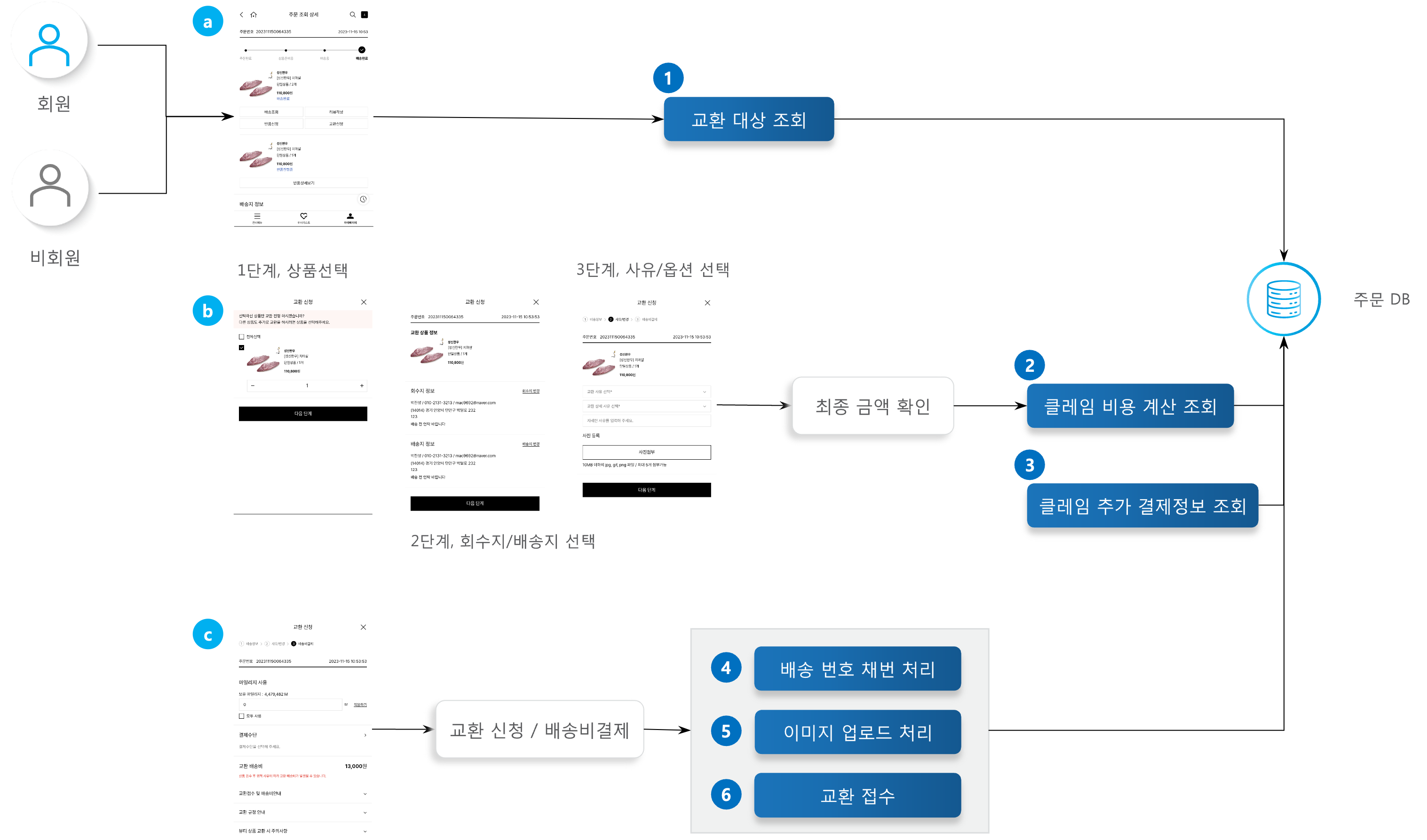
Process Definition — Exchange Request

1

Exchange Target Lookup

Users can submit an exchange request via the order list or order detail page. The list of exchange-eligible products among the ordered products is retrieved and displayed in the exchange request popup.

2

Claim Cost Calculation Lookup

Retrieves the additional payment cost based on the exchange reason.

3

Claim Additional Payment Information Lookup

If an additional cost arises, retrieves the list of available payment methods, and for members, their held mileage information.

4

Delivery Number Issuance Processing

Issues a new delivery number for the pickup/delivery address to be used for the exchange request.

5

Image Upload Processing

Uploads the attached reason image.

6

Exchange Request

Processes the exchange request for the selected product.


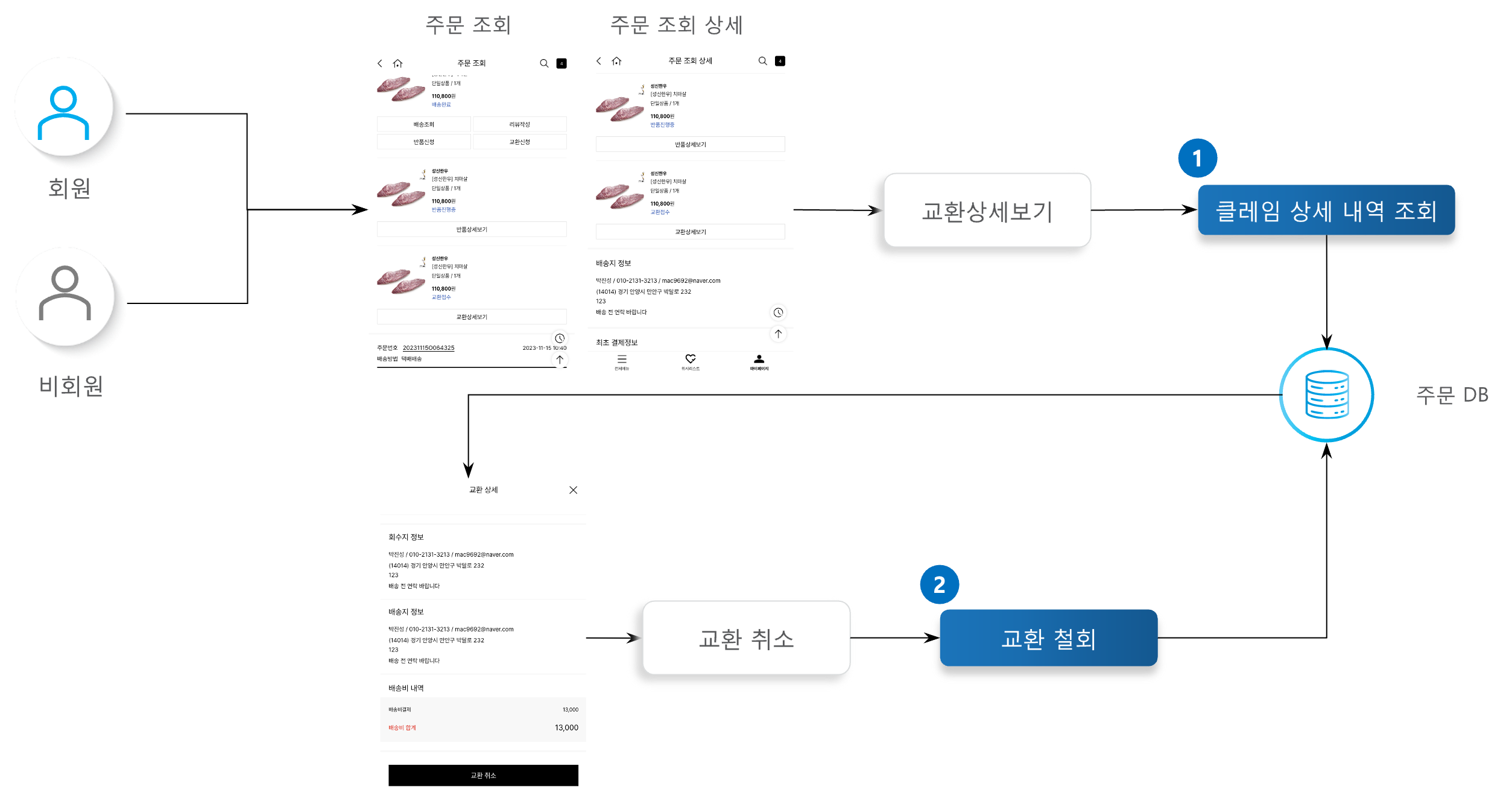
Process Definition — Exchange Cancellation

1

Claim Detail Lookup

Retrieves the exchange request history. Provides the exchange progress status, payment history, and delivery/pickup address information.

2

Exchange Withdrawal

Users open the exchange detail popup via the order list or order detail page. The Cancel Exchange button appears for exchange requests eligible for withdrawal. Clicking the Cancel Exchange button processes the cancellation of that exchange.


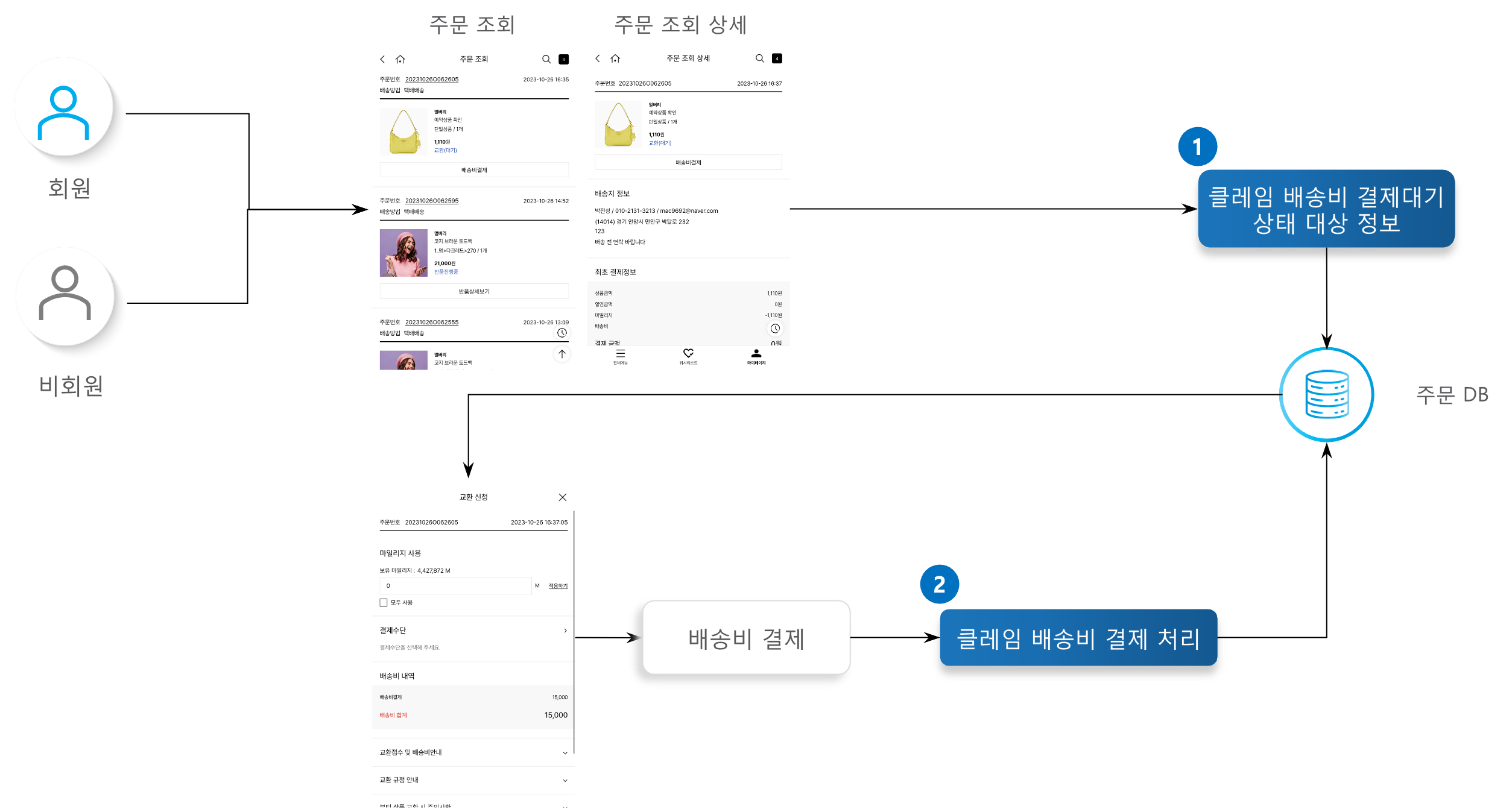
Process Definition — Delivery Fee Payment

When this occurs, the request status is marked as “Payment Pending,” and the customer proceeds with payment directly via the delivery fee payment popup.

1

Claim Delivery Fee Payment-Pending Status Target Information

Retrieves the additional payment amount and payment method information. For members, retrieves their held mileage information. For exchange requests, an exchange delivery fee may be incurred depending on the exchange reason.

2

Claim Delivery Fee Payment Processing

Requests payment using the selected payment method.


API Function List

API
Description
Server
Method
Remarks

Exchange Target Lookup

Retrieves exchange-eligible products among the ordered products. Retrieves the order information and common codes needed to process an exchange request.

Order

POST

Exchange Request

Processes the exchange request for the selected product. An exchange delivery fee may be charged depending on the exchange reason, and payment is requested if a cost arises. Stock for the exchange product is deducted, and a notification is sent to the customer after the exchange request is completed.

Order

POST

Exchange Request Withdrawal

Withdraws the exchange request. Refunds the amount paid at the time of the exchange request, processes the stock increase/decrease, and sends a notification to the customer once the exchange withdrawal is complete.

Order

POST

Claim Cost Calculation Lookup

Retrieves the additional cost, benefits, and additional payment amount incurred during exchange.

Order

POST

Delivery Number Issuance Processing

Generates a new delivery number for the exchange pickup/delivery address.

Order

POST

Image Upload Processing

Uploads the attached image according to the exchange responsible party reason.

Order

POST

Claim Additional Payment Information Lookup

If an additional payment amount arises during exchange, retrieves the payment method and mileage information.

Order

POST

Claim Delivery Fee Payment-Pending Status Target Information

Retrieves the additional payment amount and payment method information for exchanges in Payment Pending status.

Order

POST

Claim Delivery Fee Payment Processing

Requests payment for the additional cost (exchange delivery fee) incurred at the time of the exchange request.

Order

POST


Terminology

Term
Description

Payment Pending

If the exchange reason is attributable to the customer, an exchange delivery fee is incurred. When the customer submits the exchange request directly, the delivery fee payment is processed during the request step; however, when the exchange is requested via the customer center, the request is completed only after the customer separately makes payment via the delivery fee payment screen. In this case, the status before the customer makes payment is marked as “Payment Pending.”


Other Notes

  • Exchange requests can only be submitted within the same delivery group.

  • When submitting or cancelling an exchange request, the processable order history status and order history classification values are checked. This information is managed via a common code.

    • ST007 (FO System Claim-Processable Status) reference value 1 = order history status code

    • ST007 (FO System Claim-Processable Status) reference value 2 = order history classification code

  • Exchange reasons are managed via a common code, and include information such as the responsible party classification, target order history classification, and whether it is exposed in FO, for each reason.

  • For products with a gift item, partial-quantity exchange is not possible.

  • If a payment method that does not support partial cancellation was used at the time of order, only a full exchange is possible.

  • Exchange is only possible for a general product (reservation products are not eligible) of the same price that is currently on sale.

  • Exchange is not possible if the product has no stock.

  • If the exchange reason is attributable to the customer, an exchange delivery fee is incurred.

  • If an exchange delivery fee is incurred, a payment request is made, and it is refunded upon cancellation.

  • When an exchange request is submitted, the stock of the exchange product is deducted, and it is restored upon cancellation.

  • When cancelling an exchange in the Pickup Instructed status, the delivery instruction cancellation quantity is updated.