For the complete documentation index, see llms.txt. This page is also available as Markdown.

My Page

Provides a feature for logged-in members to efficiently view a variety of information about the shopping mall. Members can easily check their purchase performance over the past 6 months, grade information, employee status, available benefits, order/delivery status, and activity status on My Page.


Key Features

  • Get Member Basic Information

    • Retrieves the member's own member number, member name, and employee status.

  • Get Benefit and Purchase Information

    • Members can check their mileage balance and the number of promotion coupons they hold.

    • Retrieves the member's grade and calculates it based on purchase performance over the past 6 months.

  • Get Activity and Inquiry Status

    • Retrieves the number of event participation records, product Q&A entries, and 1:1 inquiries.

  • Get Menu and Favorites

    • Retrieves the full menu list and the list of menus registered as favorites.

  • Get Employee Discount Information

    • For employees, retrieves the discount limit and remaining balance.

  • Get Grade Renewal Information

    • Retrieves the current grade and all grade information for grade renewal.

  • Get Purchase Amount by Period

    • Checks the purchase amount required for grade renewal by retrieving purchase performance over the past 6 months.

Process Definition

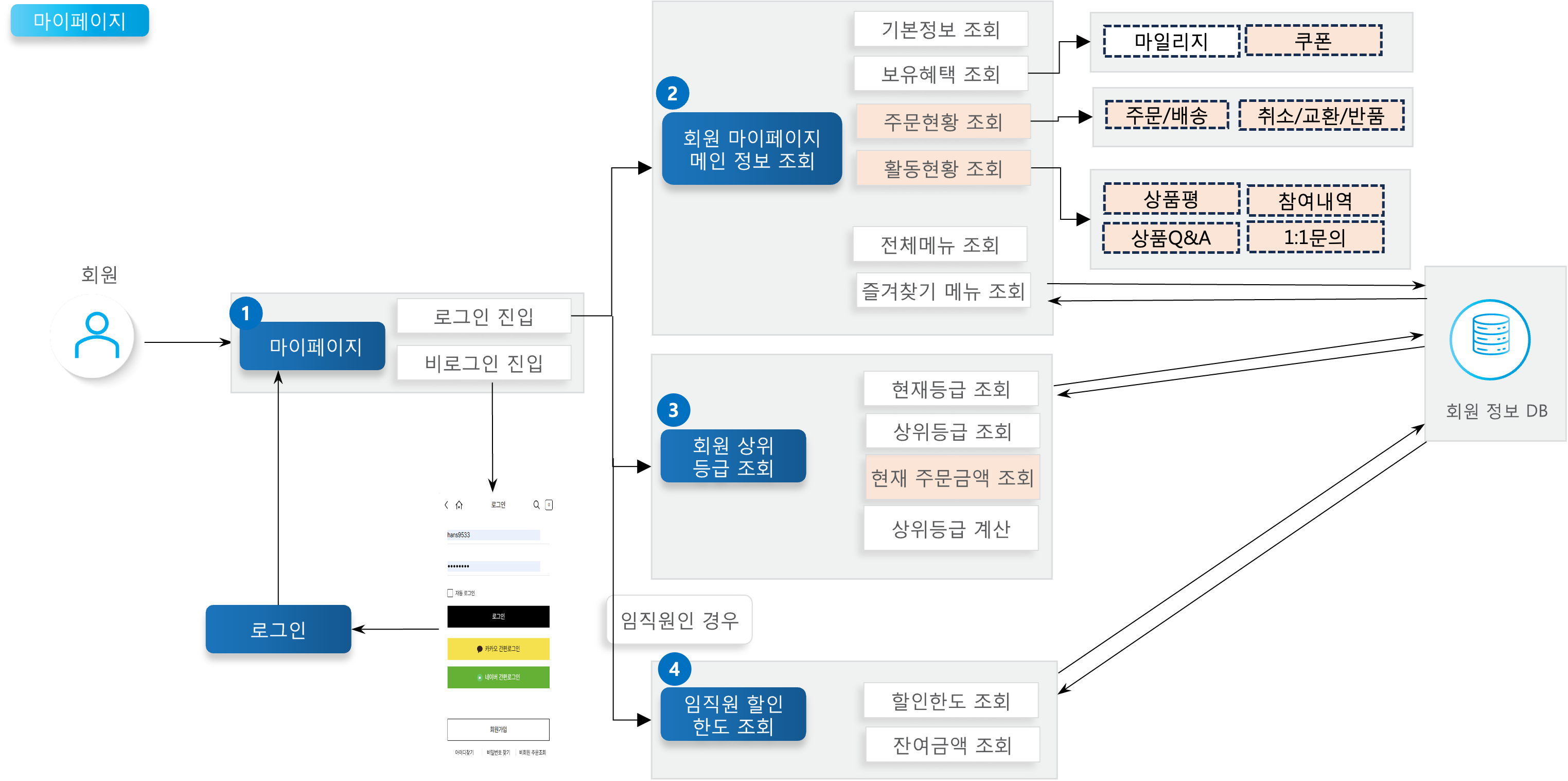
1

My Page

When a member accesses My Page, if the member is logged in their information is displayed; if not logged in, they are redirected to the login page.

2

Get My Page Main Information

Retrieves the main information for the member's My Page.

  • Basic information, all/favorite menus: Retrieves the member number, employee status, and member name corresponding to basic information from the member database, along with the full menu list and favorites menu list.

  • Available benefits: Retrieves mileage from the member database and coupon count from the Promotion API.

  • Activity status: Retrieves event participation from the Event API, product Q&A from the Product API, and 1:1 customer service inquiry count from the Order API.

3

Get Member's Next Grade

Retrieves the member's grade information. The member's grade is calculated monthly based on purchase performance over the past 6 months.

  • Retrieves the grade information registered in the member database along with the current member grade.

  • Retrieves purchase performance over the past 6 months from the Order API to calculate the member's next higher grade.

4

Get Employee Discount Limit

If the member is registered as an employee, retrieves the discount limit and remaining balance based on the discount limit registered by the corresponding company. The discount limit resets every year.

API Function List

API
Description
Server
Method
Remarks

Get My Page Main Information

Retrieves the member's available benefits, activity status, favorites list, and full menu list. Get coupon issuance list: v1/marketing/cpnIssuList Get my event participation count: v1/marketing/getParticipationEventCount Get product Q&A count by member: v1/qna/getUserQnaCount Get 1:1 inquiry count: v1/customerservice/getInquiryCount

Member

GET

Get Member's Next Grade

Looks up the grade information table using the purchase amount from the past 6 months to retrieve the current grade and the next higher grade.

Member

GET

🔗View API > Get purchase amount by period: v1/member/getOrdTotAmt

Get Employee Discount Limit

Retrieves the employee discount limit amount and the remaining balance after usage on orders.

Member

GET

Get Order/Delivery Claim Count

Retrieves the order/claim count from the Order module upon entering My Page.

Order

POST

Definition of Terms

Term
Description

Member Grade

Grades range from GREEN (default) up to VVIP, and are calculated monthly based on purchase performance over the past 6 months. Higher grades receive more benefits.

Employee Discount Limit

If a member is registered as an employee of the corresponding company, they can receive discount benefits up to the limit set by the company. The employee discount limit resets on January 1 every year.

Other Notes

Grade Criteria

  • Grade calculation is processed monthly by a grade calculation batch, which sums each member's purchase amount over the past 6 months.

  • The order amount criteria are based on the amount in the reference 2 value of the common code: Member Grade Code (ME008).

Grade
Purchase Performance

GREEN

0 (New)

FAMILY

50,000 or more

GOLD

200,000 or more

VIP

300,000 or more

VVIP

500,000 or more

Grade Calculation

e.g. December 2023 grade \

  • If purchase performance from 2023.06.01 to 2023.11.30 is 300,000 KRW, the member's grade is 'GOLD'.

Order Status

  • If there is no order/delivery claim count data, or if all values are 0, the order status data will not be displayed.

  • If an API call results in an error, the count is treated as 0 and the order status is not displayed.