Login
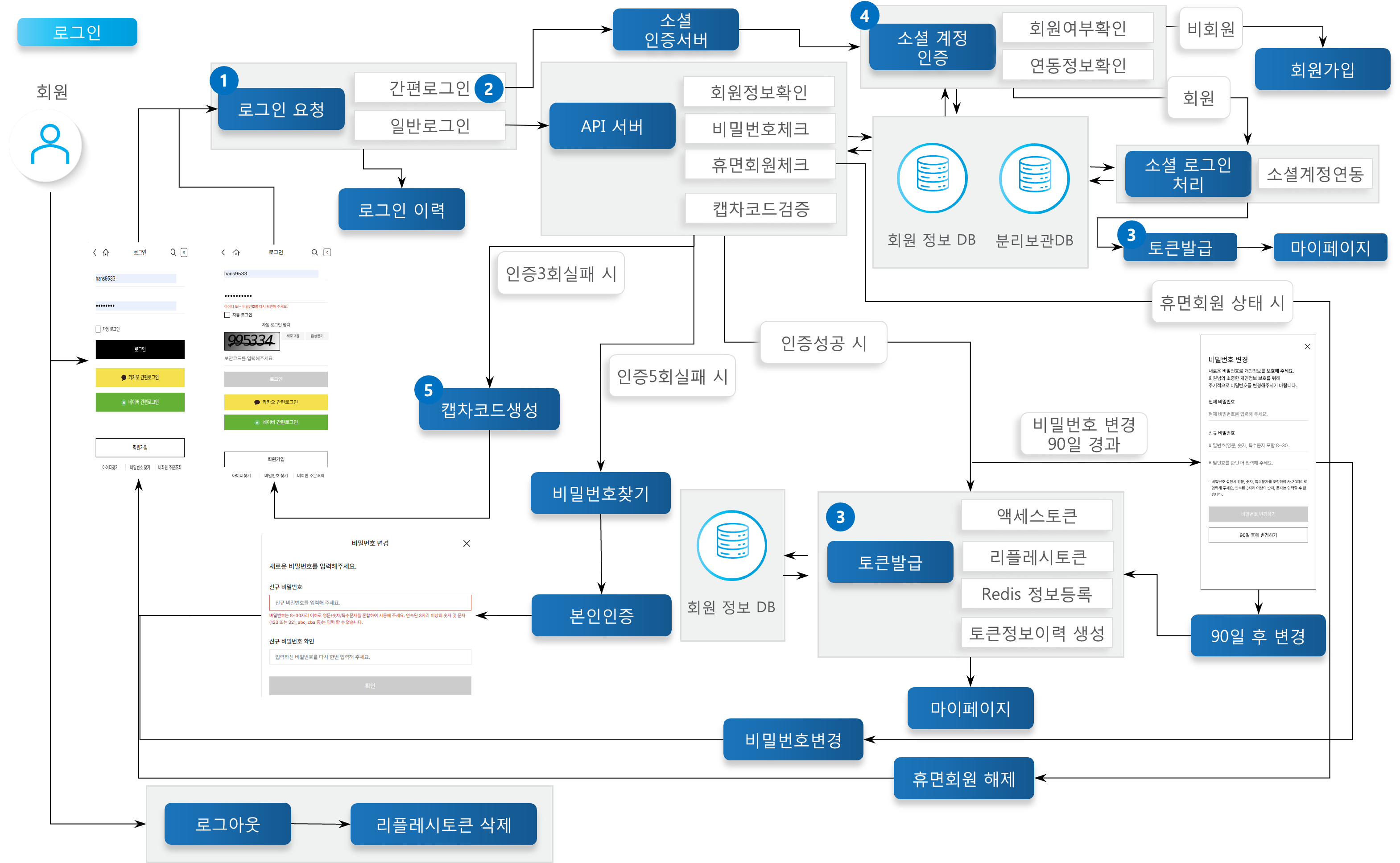
Provides authentication functions that allow enrolled members to log in to the X2BEE shopping mall and access their account. Through this, members can enter their personal information and log in to enjoy a personalized shopping experience. Login supports both general login and simple login (Kakao, Naver), and also includes dormant member restoration when a dormant member logs in through identity verification.
Key Features
General Login
Members who have completed sign-up can log in by entering their ID and password.
Simple Login
Members who completed sign-up via Kakao or Naver authentication can log in easily through the corresponding social channel.
Dormant Member Restoration
If a dormant member logs in via identity verification, dormant member restoration processing can be performed.
Token Issuance
Upon successful login, an access token (AccessToken) and a refresh token (RefreshToken) are issued.
Token Types
Access Token (AccessToken): Issued for site usage and valid for 2 hours.
Refresh Token (RefreshToken): Used to renew the access token once it expires, and is valid for 3 hours.
Information Included in accessToken
mbrNo: Member number
langCd: The member's sign-up site country and login location
Registration to Redis Storage
Upon login, the information is registered to Redis storage so each module can check permissions and use the UserDetail (member basic information).
CAPTCHA Code Verification
CAPTCHA code verification is performed to prevent brute-force attacks after more than 3 login errors.
Process Definition

Login Request
The user enters a username and password on the login page in the client application to attempt login. When a customer logs in, they enter their member ID and password, which is sent to the server as an authentication request; the server verifies the user's identity, after which the customer can use the site.
Simple Login
Simple login allows a user to easily log in to the website by linking a social media account. When implementing social login, authentication protocols such as OAuth 2.0 and OpenID Connect are used to integrate with social media platforms and obtain user authorization to complete the login process. This allows users to conveniently log in to the service using their social media account.
Token Issuance
Token issuance mainly refers to the process of providing the client with an access token and a refresh token after user authentication. The access token is valid for 2 hours, after which it loses its authority and the site can no longer be used. The refresh token is valid for 3 hours, after which it loses its authority and the access token can no longer be renewed.
API Function List
Login
When logging in, two tokens required for site usage are generated: accessToken and refreshToken. The accessToken is used to confirm that a request to each module was made by a properly logged-in user, and the refreshToken is used to generate a new accessToken once the accessToken's validity period has expired.
Member
POST
Logout
Deletes the refreshToken information generated at login from the database.
Member
POST
Social Login Processing
Logs in using a social account. Supported when the social account is linked, or when the member signed up using the social account.
Member
POST
Token Refresh
When the accessToken generated at login has expired, uses the refreshToken to generate a new accessToken and extend its validity period.
Member
POST
Social Account Verification
Uses the social account information and identity verification CI value to determine member status and whether the social account is linked, and supports the service of processing login if the social account is linked, providing a permission message for linking if the social account is not linked, and redirecting to the sign-up page if the user is not a member.
Member
POST
Token Login
Uses the token for auto-login and biometric login to generate an accessToken and refreshToken that can be used for site access.
Member
POST
Token Issuance
Generates a token for auto-login and biometric login; this token is managed both by its own validity period and by the server's database. The validity period of this token is 10 years.
Member
POST
Token Deletion
Deletes the token information generated for auto-login and biometric login from the database.
Member
DELETE
Dormant Member Restoration Processing
Restores the separately stored personal information of a dormant member to normal member status. api/goods/v1/qnaWithdraw/updateRecoveryQna api/order/v1/member/restoreMemberOrderInfo api/order/v1/customerservice/restoreMember api/event/v1/common/undoSeparate api/event/v1/common/mergeMbrBase api/event/v1/common/mergeMbrDlvp
Member
POST
CAPTCHA Code to Speech
Converts the generated CAPTCHA code to speech when it is difficult to identify visually.
Member
GET
CAPTCHA Code Generation
When login fails more than 3 times, randomly generates a 6-digit number to prevent brute-force attacks and other security issues.
Member
GET
Definition of Terms
CAPTCHA Code
One of the security mechanisms used on websites or applications to prevent automated sign-ups, spam, and bot attacks. A CAPTCHA code is a test that allows the system to determine whether the user is a human or a robot, typically implemented by displaying distorted letters or numbers and asking the user to recognize them.
Access Token
A string used to prove that a client has been granted permission to access server resources. An access token is valid only for a limited period and can be reissued or revoked as needed.
Refresh Token
One of the security tokens used in the OAuth 2.0 protocol. It is mainly used to obtain a new access token after the access token has expired.
Simple Login
A feature used to log in to another website or app using a social media account or another online service account.
Dormant Member
Refers to a member who has not logged in or used the service for a certain period. A user is considered dormant if they have not logged in or used the service for 1 year.
Other Notes
Authentication and Authorization
The accessToken and refreshToken generated via JWT authentication at login each have their own validity period set within the token, and authentication fails once that period has passed.
Tokens generated through login are stored in the server-side ET_MBR_CERTI_TKN_ISSU_INFO table.
When logging in or renewing with the refresh token, or with the auto-login or biometric authentication token, authentication and authorization are double-checked based on the token's own validity period and its existence in the ET_MBR_CERTI_TKN_ISSU_INFO table.
Member Information Redis Cache Registration
Upon successful login, the generated UserDetail information is registered to Redis storage, and each module retrieves the UserDetail information using the accessToken issued at login when making API requests.
UserDetail records the member name, member number, member management code (ME002), member classification code (ME001), login ID, member grade code (ME008), employee status, gender classification code (ME017), adult verification status, age, country code, and company classification code (ME038).
Dormant Member Restoration
The password is entered to confirm the account owner, and if the password matches, the data stored in the separate storage database is transferred to the general database.
When restoring a dormant member, the api-member data is restored first; once the restoration succeeds, a request is sent to each module's API for dormant member restoration processing.
If a module fails during the restoration process, the information of the failed module is recorded in the ET_STP_MBR_FAIL_INFO table and later re-executed via the reTrySeparateJob batch.
CAPTCHA Code
The SimpleCaptcha library is used for the CAPTCHA code.
Login Restriction
At login, the country code of the site where login is attempted is compared with the country code registered at sign-up; login is restricted if they do not match.
Token Login Supports Auto-Login and Biometric Login
To enable auto-login, the auto-login checkbox must be checked before logging in; the auto-login token has a validity period of 10 years.
Biometric login is an app-only service and can be enabled through My Page settings after logging in via the app. The biometric login token has a validity period of 10 years.
Social Login
Social login can be used after initially signing up through a social channel, or after linking a social channel account through My Page settings while logged in as a general member.
X2BEE shopping mall currently supports social login via Kakao and Naver accounts.
Identity Verification Service Configuration and Development
To enable auto-login, the auto-login checkbox must be checked before logging in; the auto-login token has a validity period of 10 years.
Biometric login is an app-only service and can be enabled through My Page settings after logging in via the app. The biometric login token has a validity period of 10 years.
Naver / Kakao Configuration Example
Naver Login
Module: API-MEMBER
Configuration files:
application-local.properties,application-dev.propertiesApplication properties:
Naver Login related API: Naver Developer Link >
User lookup token issuance URL: https://nid.naver.com/oauth2.0/token
User lookup URL: https://openapi.naver.com/v1/nid/me
Mobile environment (env.local, env.dev) environment variables:
Kakao Login
Module: API-MEMBER
Configuration files:
application-local.properties,application-dev.propertiesApplication properties:
Kakao Login related API: Kakao Developer Link >
User lookup token issuance URL: https://kauth.kakao.com/oauth/token
User lookup URL: https://kapi.kakao.com/v2/user/me
Mobile environment (env.local, env.dev) environment variables:
Logout
When logging out, the refreshToken and the auto-login/biometric authentication tokens are deleted, restricting any subsequent authentication requests made with those tokens.