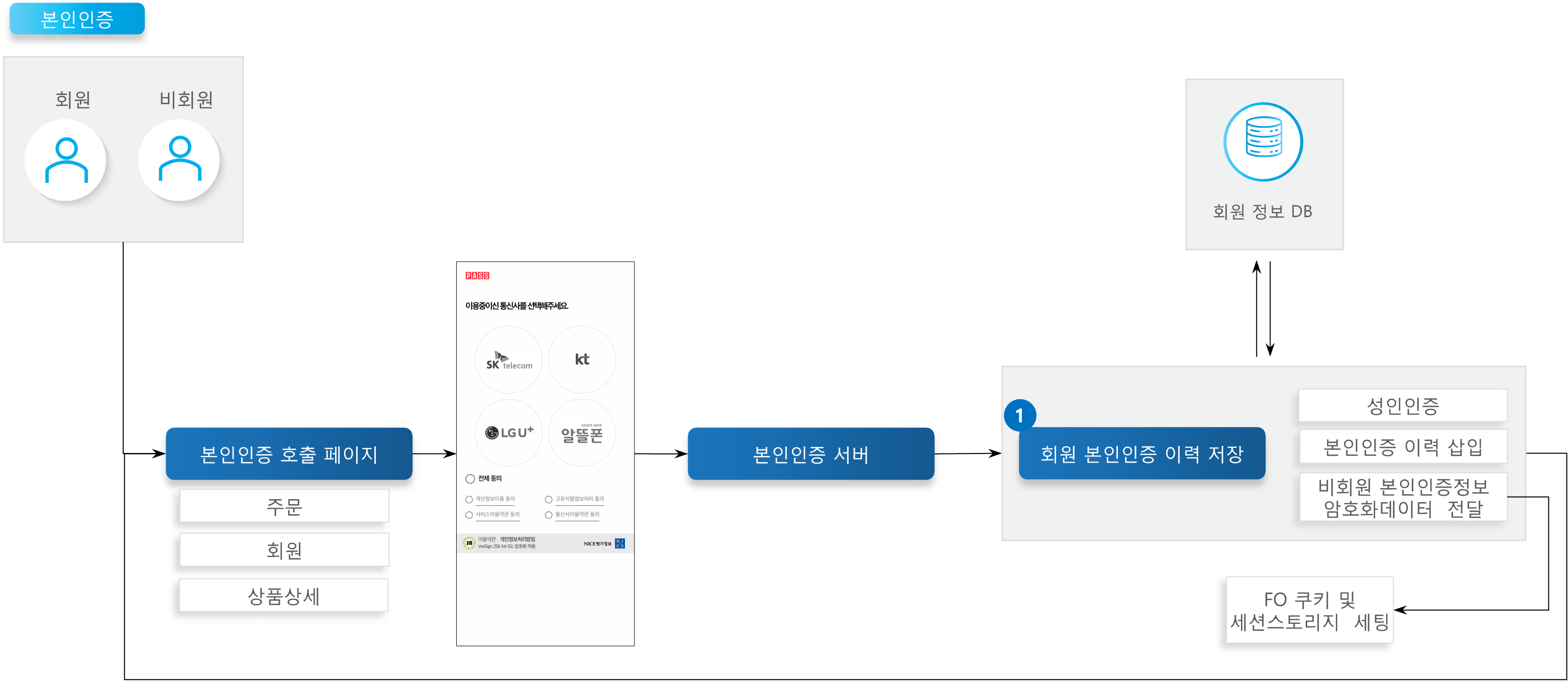
| API | Description | Server | Method | Remarks |
|---|---|---|---|---|
| Save Member Identity Verification History | After mobile identity verification, saves the result of the identity verification process carried out per module, and if the request classification code indicates an adult verification request, updates the member's adult verification status. | Member | POST | 🔗View API> |
| Term | Description | Remarks |
|---|---|---|
| Identity Verification | Mobile identity verification allows the unique identifying information (CI) to be obtained. This information can be used to confirm a member's identity, and helps protect personal information and enable secure transactions. |
| Verification Result | Name | Key | Remarks |
|---|---|---|---|
| Common | CP Request Number | REQ_SEQ | Max 30 Bytes (generated/arbitrary value) |
| Verification Method | AUTH_TYPE | M: Mobile Phone C: Card X: Certificate P: Samsung Pass | |
| Verification Success | Result Unique Number | RES_SEQ | 24 Bytes |
| Name | NAME | 50 Bytes, EUC-KR | |
| UTF-8 Name | UTF8_NAME | 50 Bytes, UTF-8, requires URLDecode processing | |
| Date of Birth | BIRTHDATE | YYYYMMDD | |
| Gender Code | GENDER | 0: Female, 1: Male | |
| Domestic/Foreign National Code | NATIONAINFO | 0: Domestic National, 1: Foreign National | |
| Duplicate Sign-Up Check Value (DI Value) | DI | 64 Bytes, not returned for card-birthdate verification | |
| Connecting Information Check Value (CI Value) | CI | 88 Bytes, not returned for card-birthdate verification | |
| Carrier Information | MOBILE_CO | 3 Bytes, mobile phone verification only | |
| Mobile Phone Number | MOBILE_NO | 24 Bytes, mobile phone verification only |
| File | Setting/Description | Remarks |
|---|---|---|
| niceid.js | Line 8: sSiteCode = site code Line 9: sSitePW = site password. Windows OS users: Uncomment line 16 Comment line 17. MAC OS users: Comment line 16 Uncomment line 17 | MAC OS users must change the permissions of the identity verification module. e.g. from the venus-x2bee-mo-vanilla path, run $ sudo chmod 755 CPClient_mac, then run the CPClient_mac file once, and approve the 'Open App from Unidentified Developer' permission. |
| checkplus_success.js | Line 7: sSiteCode = site code Line 8: sSitePW = site password. Windows OS users: Uncomment line 13 Comment line 14. MAC OS users: Comment line 13 Uncomment line 14 | MAC OS users must change the permissions of the identity verification module. e.g. from the venus-x2bee-mo-vanilla path, run $ sudo chmod 755 CPClient_mac, then run the CPClient_mac file once, and approve the 'Open App from Unidentified Developer' permission. |