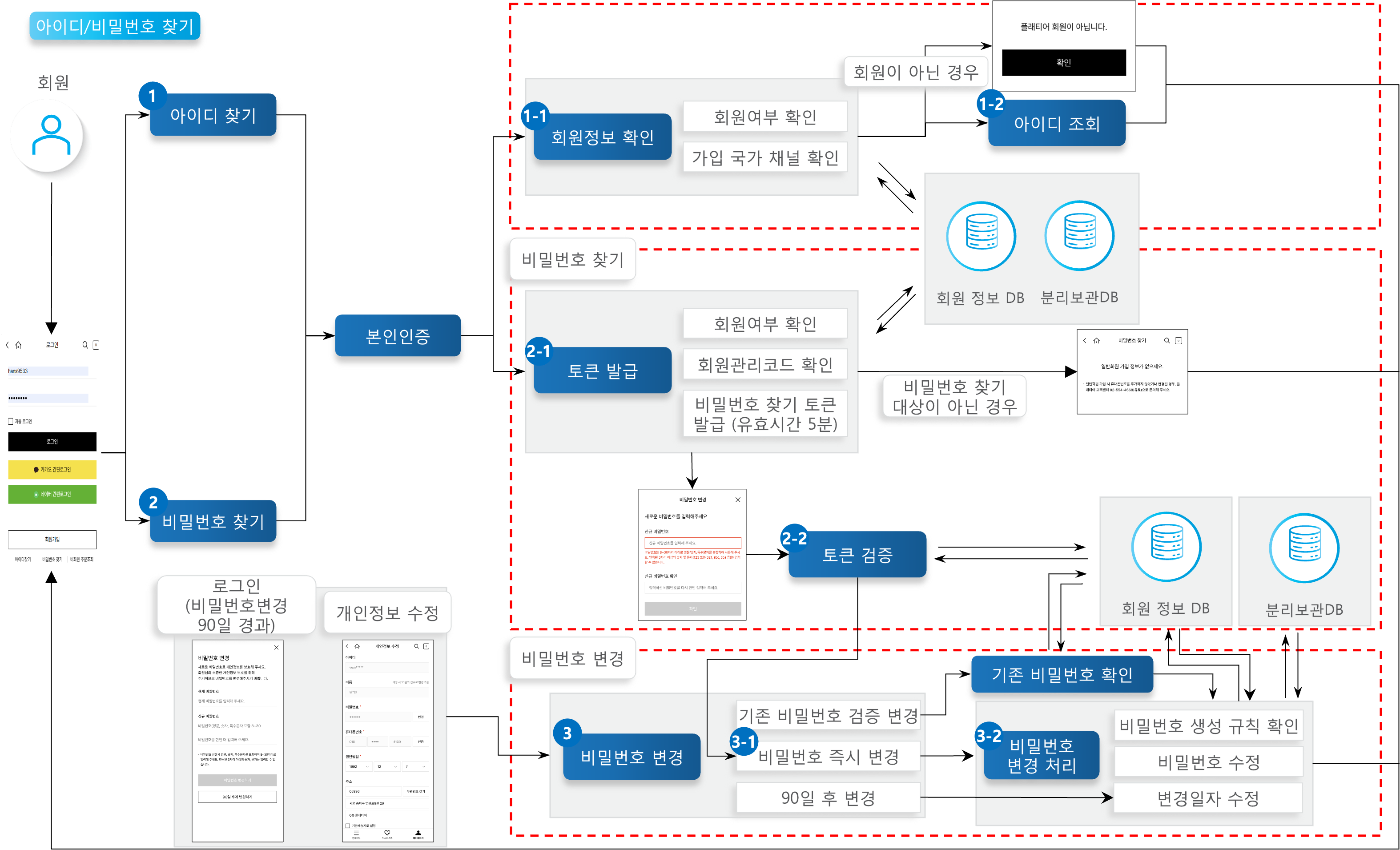
Find ID/Password
Provides a feature for general members enrolled in the shopping mall to recover a lost ID or password. This service verifies identity through mobile phone identity verification, then retrieves and modifies data from either the separate storage DB or the general DB depending on dormant member status. When a password recovery request is made, a JWT-based token valid for 5 minutes is generated and used to proceed with the password change.
Key Features
Find ID and Password
Members can find their ID by completing mobile phone identity verification and confirming their registered mobile phone number.
Members can find their password by completing mobile phone identity verification and confirming their registered mobile phone number and ID.
Mobile Phone Identity Verification
Members verify their identity through mobile phone identity verification, confirming whether it matches the mobile phone number of the account they are trying to find.
Dormant Member Lookup and Modification
For dormant members, data is retrieved and modified from the separate storage DB.
Token Generation
When a password recovery request is made, a JWT-based token valid for 5 minutes is generated.
Token Authentication and Authorization
Authentication and authorization are performed by comparing the validity period of the received token with the token stored on the server side.
Password Change
Once token authentication is complete, the password is changed to the new password requested by the user.
Process Definition

Find Password
The user finds the password of their lost account.
2-1. Token Issuance
After verifying member information using the identity verification information and the provided member ID, a password recovery token valid for 5 minutes is generated and saved on the server side.
2-2. Token Verification
Before proceeding with the password change, the system checks whether the password recovery token generated in the previous step is valid.
Password Change Request
The user requests to change to a new password. There are three password change processes: verified change of the existing password, immediate password change, and change after 90 days; each process branches based on a classification type code. In the password recovery flow, the immediate password change process is used.
3-1. Immediate Password Change
For a token that has been authenticated and authorized in [Token Verification], the password is changed to the new one without requiring the account's existing password.
3-2. Password Change Processing
The password change processing applies the password creation rules, modifies the password, and updates the password change date.
API Function List
Find Password (Generate Token)
Finds the password of a member who has lost their account password. When finding a password, identity verification is followed by generation of a token for the password change.
Member
POST
Find Password (Change Directly)
Finds the password of a member who has lost their account password. Proceeds after the Find Password (Generate Token) step, using the generated token to request the password change.
Member
PUT
Used in V1.03 source
Find Password
Finds the password of a member who has lost their account password. Proceeds after the Find Password (Generate Token) step, using the generated token to request the password change.
Member
PUT
Used in V1.0 source
Change Password
Changes the member's account password. Changes the password to the new one requested by the member.
Member
PUT
Find ID
Finds the account ID of a member who has lost their ID. After identity verification, looks up the ID of the account registered with that information.
Member
POST
Definition of Terms
Password Recovery Token
A token generated via JWT authentication, valid for 5 minutes. If the password is not changed within 5 minutes, the identity verification process must be repeated to generate a new token.
Verified Password Change
To change the password, the user enters the previous password and the new password. The change proceeds to the new password only if the previous password matches.
Immediate Password Change
To change the password, the user enters only the new password. This process is used when the account password has already been verified in a prior step; the password can be changed after that prior process (password verification) is complete.
Change After 90 Days
A service that defers the password change for 90 days by updating the member's password change date to the current date while keeping the current password.
Other Notes
Find Password (Generate Token)
Finds the password for members who signed up as general members and have lost their password. For social members, since the password for each social channel is managed separately, password recovery must be done through the respective social channel.
If the account owner is confirmed to match through identity verification, a password recovery token is generated for changing the account password. This token is generated using JWT authentication and is valid for 5 minutes. The generated token information is stored in the server's ET_MBR_CERTI_TKN_ISSU_INFO table.
Find Password (Change Directly)
When a request comes in with the token generated in Find Password (Generate Token), the system checks whether the token is within its validity period and was properly generated by the server. If the request is made with a valid token, the password is changed to the new one entered by the user, and the token is discarded and can no longer be reused.
The Find Password (Change Directly) process uses the 'Immediate Password Change' service among the password change processes.
Change Password
Changes the member's password. Password changes only apply to general members whose passwords are directly managed by the X2BEE shopping mall.
When changing the password, the process branches into three services depending on the classification value: 'Verified Password Change', 'Immediate Password Change', and 'Change After 90 Days'.
Verified Password Change takes both the existing password and the new password and processes the change only if the existing password matches.
Immediate Password Change is used after the existing password has already been verified before accessing the password change page. Only the new password is entered before proceeding with the change.
Change After 90 Days updates the password change date to the current time while keeping the current password.
Identity Verification
To use the Find ID or Find Password service, the user must go through the mobile phone identity verification process to confirm both membership in the X2BEE shopping mall and account ownership.