For the complete documentation index, see llms.txt. This page is also available as Markdown.

Notice / FAQ

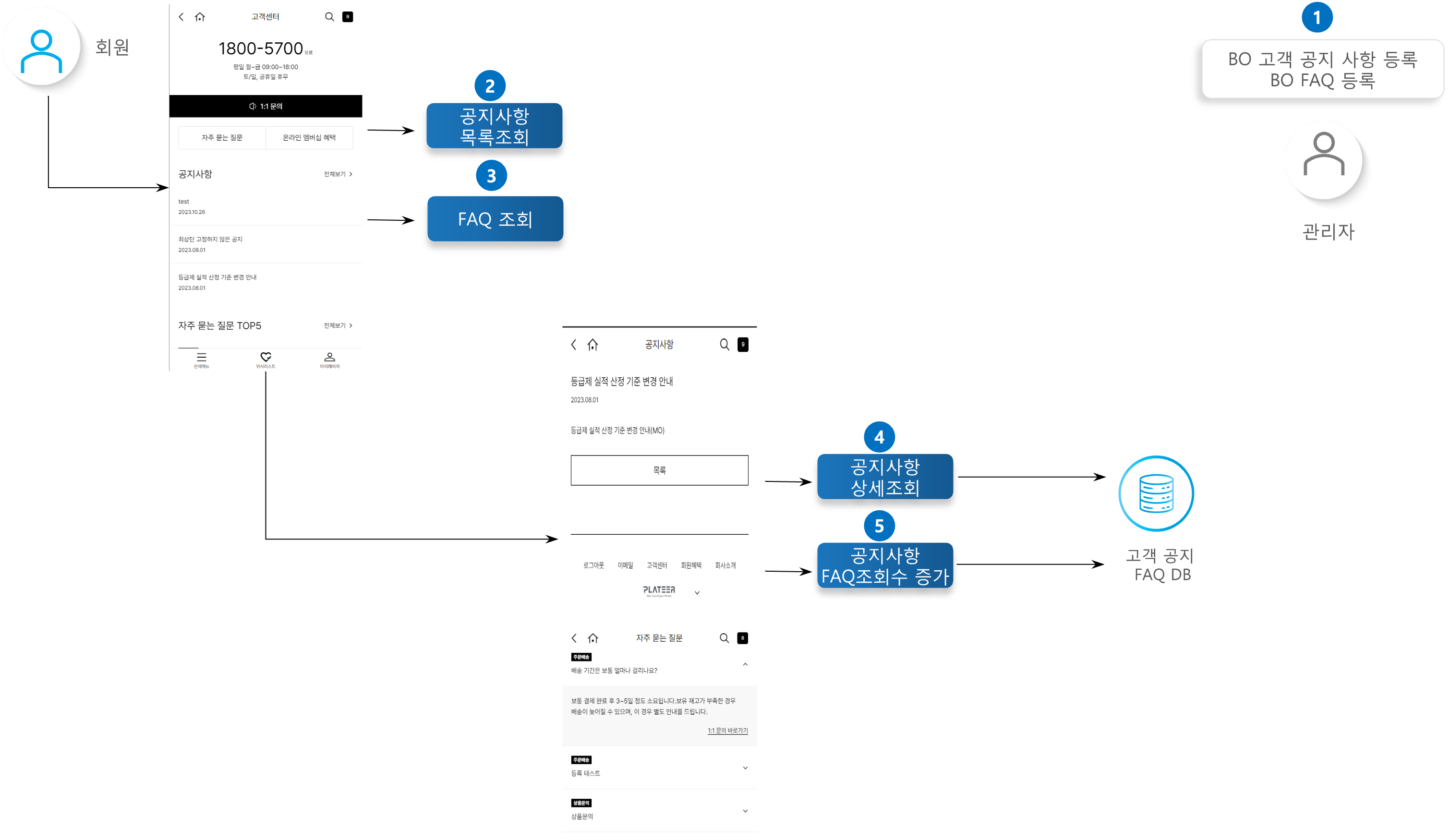
The shopping mall administrator can effectively manage customer notices and FAQs from the Back Office (BO). The information registered by the administrator is then properly delivered to customers through Customer Service.


Key Features

  • View currently displayed information

    • In the BO, administrators can see the customer notices and FAQs currently on display.

  • Detail information inquiry

    • The detailed content of a customer notice or FAQ can be checked in the BO.

  • View count increment feature

    • When a specific customer notice or FAQ is viewed in detail, the view count of that item is increased by 1.

    • This makes it possible to see which information customers look at more often.

Process Definition

1

BO registration

The administrator can register a customer notice or FAQ in the BO for content to be shown to customers, and it is announced through Customer Service.

2

Notice list inquiry

Retrieves the notice list and displays the notice list.

3

FAQ inquiry

Retrieves the FAQ list and displays the FAQ list.

4

Notice detail inquiry

When a notice is clicked, the detailed content of the notice is displayed.

5

Notice/FAQ view count

Increments the view count when a notice or FAQ is viewed in detail.

API Function List

Increment notice/FAQ view count

Increments the view count of the selected notice or FAQ by 1. Increments the view count when entering the detail view.

Order

PUT

Notice list inquiry

Retrieves the list of customer notices currently on display.

Order

GET

Notice detail inquiry

Retrieves the detailed content of the selected notice.

Order

GET

FAQ inquiry

Retrieves the FAQ list and its detailed content.

Order

GET