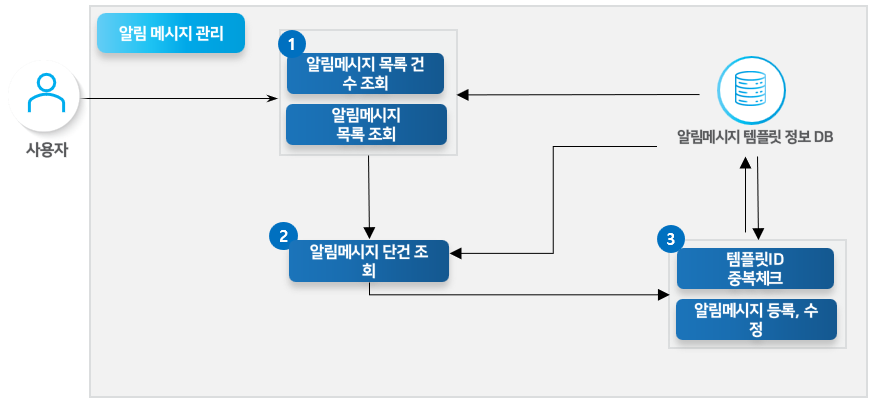
Notification Message Management
The Notification Message Management service provides functionality for defining and sending completion notification messages to customers after specific tasks are performed within the site. You can define notification message templates for tasks such as order completion, order cancellation, and 1:1 inquiries, and send them to customers via a selected notification type (KakaoTalk, SMS, notification box).
Key Features
Notification Message Definition
Defines notification messages for various tasks such as order completion, order cancellation, and 1:1 inquiries.
You can configure a template, subject, and more for a notification message.
Notification Type Selection
Sends registered notification messages to customers by selecting a specific notification type (KakaoTalk, SMS, notification box).
Template Mapping
Selects a template registered on the Notification Message Management page and maps the information to that template before sending.
Process Definition
You can look up, register, and modify notification message templates on the admin page or site.

API Function List
Notification Message List Count Lookup
Looks up the count of the notification message template list.
BO
GET
Notification Message Single Lookup
Looks up the detail information of a single notification message.
BO
GET
Template ID Duplicate Check
Checks whether a duplicate template ID exists when registering a notification message template.
BO
POST
Notification Message Registration, Modification
Newly registers a notification message template or modifies an existing template.
BO
POST
Other Notes
The template ID is a required field.
Additional required registration values based on the default notification method code (CH009):
KakaoTalk: KakaoTalk template ID
Notification box: Member notification type
If you enter a value in the form #{variableName} in the notification message content, the variable name is automatically mapped when the actual send occurs by passing it as a parameter.
If you enter a button name and button URL in the Button Name/URL fields, a button that navigates to the URL will appear within KakaoTalk and the notification box.