| API | Description | Server | Method | Notes |
|---|---|---|---|---|
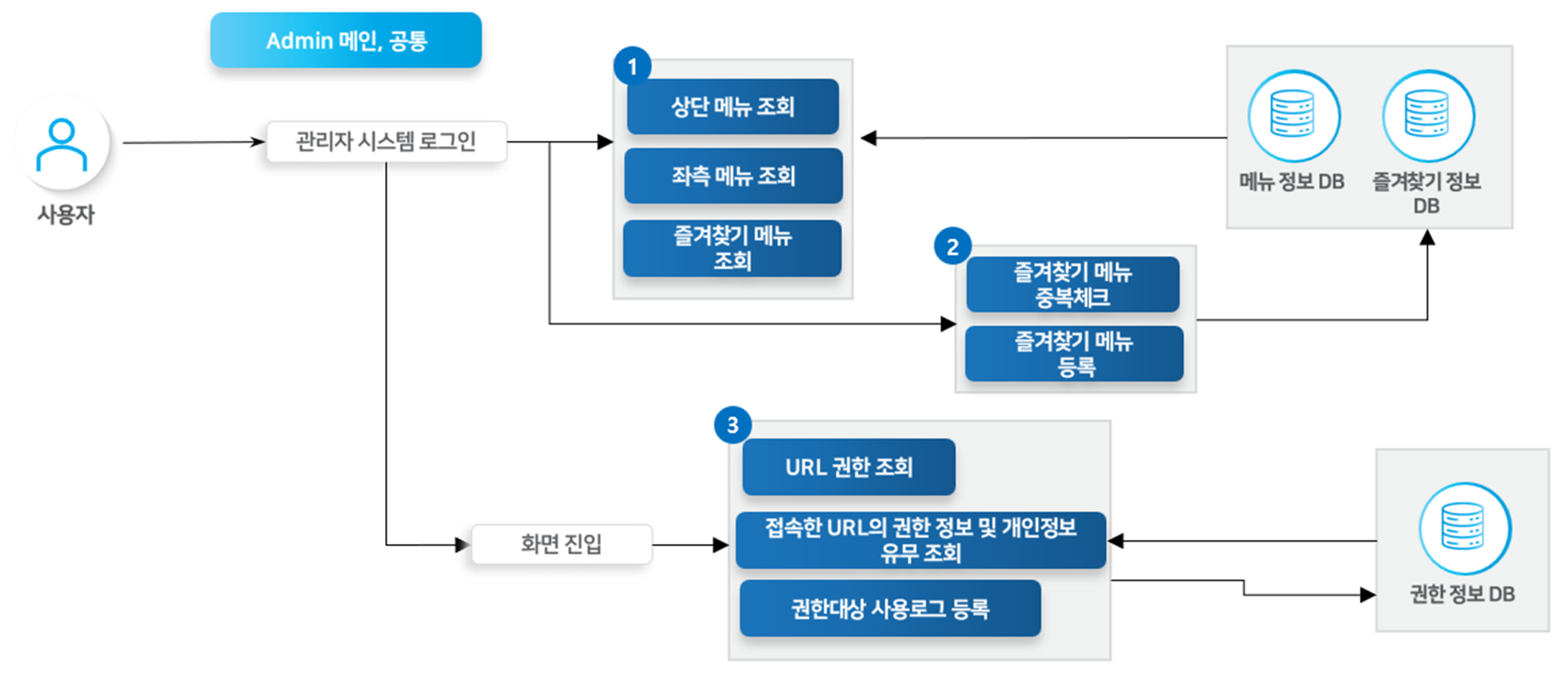
| Top Menu Lookup | Looks up the top menu of the admin system. | BO | GET | 🔗View API > |
| Left Menu Lookup | Looks up the left menu of the admin system. | BO | GET | 🔗View API > |
| Favorites Lookup | Looks up the admin system user's favorites list. | BO | GET | 🔗View API > |
| Favorite Menu Registration | Registers the admin system user's favorite menu. | BO | POST | 🔗View API > |
| Favorite Menu Duplicate Check | Checks whether the menu is already registered when registering a favorite menu. | BO | GET | 🔗View API > |
| API | Description | Server | Method | Notes |
|---|---|---|---|---|
| URL Permission Lookup | Looks up the permission for a screen URL. | BO | POST | 🔗View API > |
| Permission Information and Personal Information Presence Lookup for the Accessed URL | Looks up permission information and whether personal information is present for the accessed URL. | BO | GET | 🔗View API > |
| Permission Target Usage Log Registration | Registers the permission target usage log for the accessed screen URL. | BO | POST | 🔗View API > |
| API | Description | Server | Method | Notes |
|---|---|---|---|---|
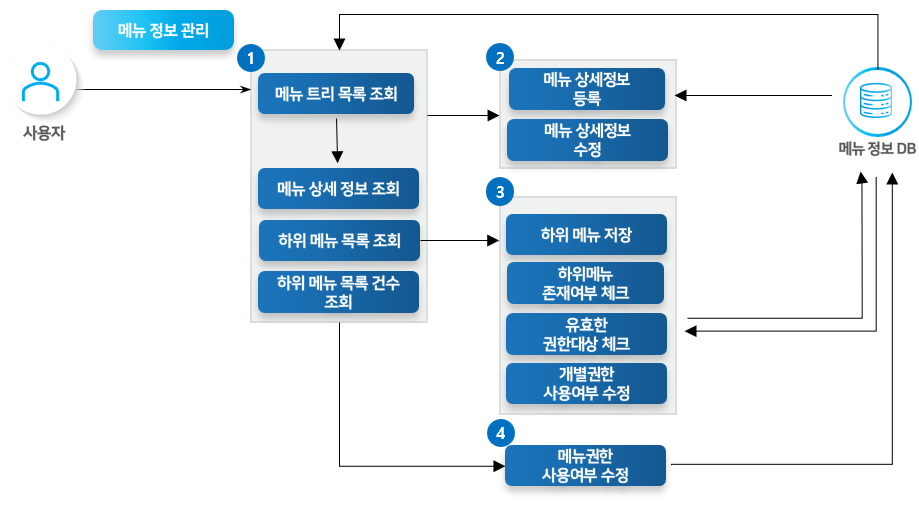
| Menu Tree List Lookup | Looks up the entire menu of the admin system as a tree-structured list. | BO | GET | 🔗View API > |
| Menu Detail Information Lookup | Looks up the detail information for the menu selected in the tree-structured list. | BO | GET | 🔗View API > |
| Sub-Menu List Count Lookup | Looks up the sub-menu list count for the menu selected in the tree-structured list. | BO | GET | 🔗View API > |
| Sub-Menu List Lookup | Looks up the sub-menu list for the menu selected in the tree-structured list. | BO | GET | 🔗View API > |
| Menu Detail Information Registration | Registers detail information for the parent menu. | BO | POST | 🔗View API > |
| Menu Detail Information Modification | Modifies detail information for the parent menu. | BO | POST | 🔗View API > |
| Sub-Menu Existence Check | When deleting a menu, checks whether sub-menus exist. | BO | GET | 🔗View API > |
| Valid Permission Target Check | When deleting a menu, checks whether a valid permission target exists for that menu. | BO | GET | 🔗View API > |
| Sub-Menu Save | Saves the sub-menu. | BO | POST | 🔗View API > |
| Menu Permission Usage Status Modification | Modifies the usage status for the parent menu. | BO | POST | 🔗View API > |
| Individual Permission Usage Status Modification | Modifies the usage status for the sub-menu. | BO | POST | 🔗View API > |