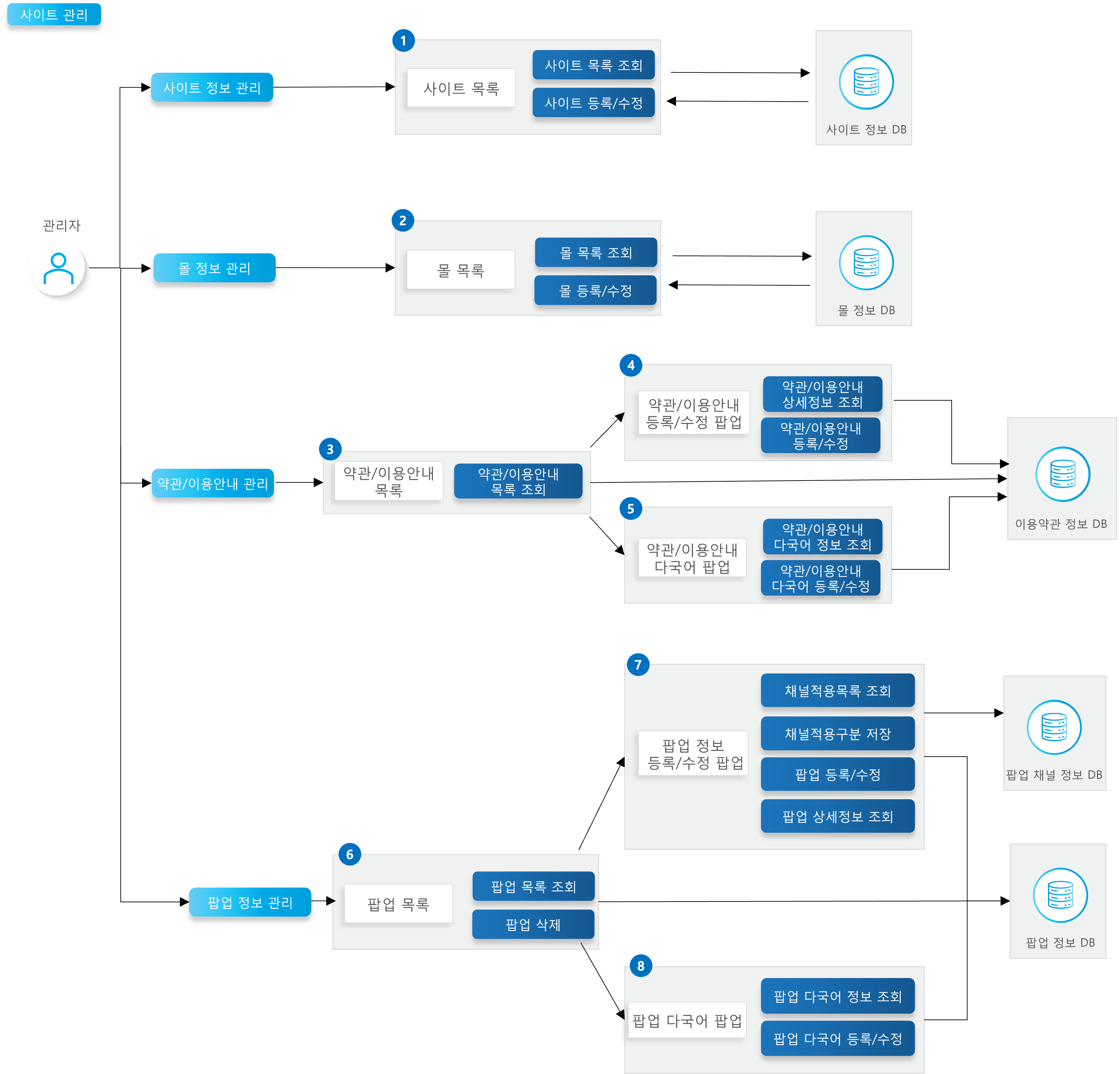
| API | Description | Server | Method | Remarks |
|---|---|---|---|---|
| Site Name List Lookup | •Looks up the list of site names. •Sorted in ascending order by site number. | BO | GET | 🔗View API > |
| Site Information List Lookup | •If no site number is given, looks up all site information. •Displayed in ascending order by site number. | BO | GET | 🔗View API > |
| Site Management Registration and Modification | •Registers and modifies site information. | BO | POST | 🔗View API > |
| API | Description | Server | Method | Remarks |
|---|---|---|---|---|
| Mall Name List Lookup | •Looks up the list of mall names. •Displayed in ascending order by display order, then mall number. | BO | GET | 🔗View API > |
| Mall Information List Lookup | •Looks up the list of mall information. •Displayed in ascending order by display order, then mall number. | BO | GET | 🔗View API > |
| Mall Information Management Registration and Modification | •Registers and modifies mall information. | BO | POST | 🔗View API > |
| API | Description | Server | Method | Remarks |
|---|---|---|---|---|
| Terms/Usage Guide List Lookup | •Looks up according to the search conditions of common terms policy classification code, terms policy code, site number, and terms title. •Displayed in descending order by modification date. | BO | GET | 🔗View API > |
| Terms/Usage Guide Detail Information Lookup | •Looks up the corresponding terms/usage guide detail information by common terms sequence number. | BO | GET | 🔗View API > |
| Terms/Usage Guide Multilingual Detail Information Lookup | •Looks up the corresponding terms/usage guide multilingual detail information by common terms sequence number. | BO | GET | 🔗View API > |
| Terms/Usage Guide Registration and Modification | •Registers and modifies the terms/usage guide detail information. | BO | POST | 🔗View API > |
| Terms/Usage Guide Multilingual Registration and Modification | •Registers and modifies the terms/usage guide multilingual detail information. | BO | POST | 🔗View API > |
| API | Description | Server | Method | Remarks |
|---|---|---|---|---|
| Popup Information List Lookup | •Looks up popup information according to the search conditions of popup period, site number, display media, and channel number/name. •Displayed in ascending order by site number, then display start date. | BO | GET | 🔗View API > |
| Popup Detail Information Lookup | •Looks up the popup detail information corresponding to the popup number. | BO | GET | 🔗View API > |
| Popup Multilingual Detail Information Lookup | •Looks up the popup multilingual detail information corresponding to the popup number. | BO | GET | 🔗View API > |
| Popup Management – Channel Application Information List Lookup | •Looks up the channel application information list corresponding to the popup number. | BO | GET | 🔗View API > |
| Popup Detail Content Registration/Modification | •Registers and modifies the popup detail content. | BO | POST | 🔗View API > |
| Popup Multilingual Content Registration/Modification | •Registers and modifies the popup multilingual detail content. | BO | POST | 🔗View API > |
| Popup Detail – Channel Application Classification Save | •Registers, modifies, and deletes the channel application information. | BO | POST | 🔗View API > |
| Popup Management List Deletion | •Deletes the popup grid information. | BO | DELETE | 🔗View API > |
| Term | Description | Remarks |
|---|---|---|
| Site | •A unit entity where online commerce services take place. •Has an independent display configuration. (e.g.) mall.x2bee.com, lotteon.com, 11st.co.kr, ssg.com | |
| Mall | •A collection selling a large/high volume of products within a site. •An attribute that groups display shops, and one or more can be created under a single site. | |
| Application Start/End Date | •The period during which the terms/usage guide is displayed for each site | |
| Popup Period | •The period during which the popup is displayed for each site |