> For the complete documentation index, see [llms.txt](https://tech.x2bee.com/llms.txt). Markdown versions of documentation pages are available by appending `.md` to page URLs; this page is available as [Markdown](https://tech.x2bee.com/api-guide/api-guides-en/store-front/member/wishlist.md).

# Wishlist

Provides a feature that allows shopping mall members to express interest in products, brands, and content, and to register, delete, and view lists of those items. This enables members to effectively manage their wishlist for specific products or brands. The wishlist screen is divided into three tabs — Product, Brand, and Promotion — and each tab shows the corresponding wishlist entries.

***

## Key Features

* **Wishlist Registration and Deletion**
  * Members can conveniently register or remove specific products, brands, or content from their wishlist.
* **Wishlist Lookup**
  * Members can view lists of products, brands, and content registered in their wishlist in the member database.

## Process Definition

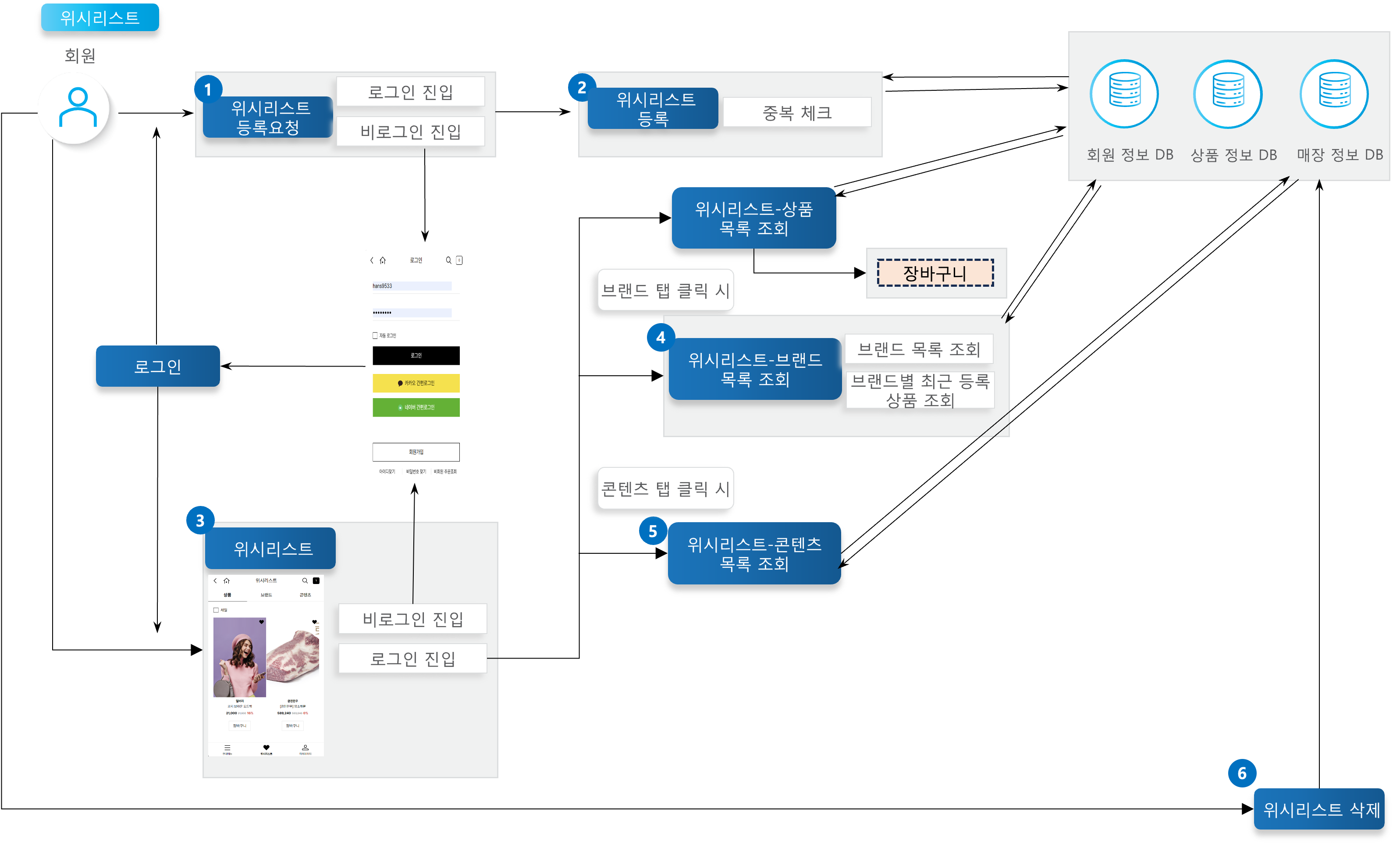
<figure><img src="https://2999922013-files.gitbook.io/~/files/v0/b/gitbook-x-prod.appspot.com/o/spaces%2FXTxKSWMmuxEkop1pvuwe%2Fuploads%2Ft0wtt7tlxZ1ZB5E4CsH1%2F%E1%84%8B%E1%85%B1%E1%84%89%E1%85%B5%E1%84%85%E1%85%B5%E1%84%89%E1%85%B3%E1%84%90%E1%85%B3.png?alt=media&#x26;token=d190a1df-d2c3-47f5-97e2-f62ce3e24e28" alt=""><figcaption></figcaption></figure>

{% stepper %}
{% step %}

### Wishlist Registration Request

When a member requests to add an item to the wishlist, if the member is logged in, wishlist registration proceeds; if not logged in, the member is redirected to the login page.
{% endstep %}

{% step %}

### Wishlist Registration

Registers a wishlist entry using the product number, brand number, content number, and similar identifiers. If the number is already saved, it cannot be saved again as a duplicate.
{% endstep %}

{% step %}

### Wishlist Access/Lookup

When a member accesses the wishlist while logged in, the wishlist product list is retrieved and displayed. When products are displayed, an Add to Cart button is generated for each so the product can be added directly to the cart. If not logged in, the member is redirected to the login page.
{% endstep %}

{% step %}

### Wishlist: Brand List Lookup

When the Brand tab is clicked on the screen, the wishlist brand list is retrieved and displayed. Each brand entry also displays the 3 most recently registered products.
{% endstep %}

{% step %}

### Wishlist: Content List Lookup

When the Content tab is clicked on the screen, the wishlist content list is retrieved and displayed.
{% endstep %}

{% step %}

### Wishlist Deletion

Deletes the product number, brand number, content number, or similar identifier stored in the wishlist from the member database.
{% endstep %}
{% endstepper %}

## API Function List

<table><thead><tr><th width="113.4443359375">API</th><th width="290.22216796875">Description</th><th width="92.4444580078125">Server</th><th width="89.111083984375">Method</th><th>Remarks</th></tr></thead><tbody><tr><td>Register Wishlist</td><td>Provides the feature to register a wishlist entry when called from Product, Brand, or Content.</td><td>Member</td><td>POST</td><td><a href="http://api.x2bee.com/content?msa=member&#x26;depth=%EC%9C%84%EC%8B%9C%EB%A6%AC%EC%8A%A4%ED%8A%B8&#x26;path=registerWishlist">🔗View API ></a></td></tr><tr><td>Delete Wishlist</td><td>Provides the feature to delete a registered wishlist entry.</td><td>Member</td><td>DELETE</td><td><a href="http://api.x2bee.com/content?msa=member&#x26;depth=%EC%9C%84%EC%8B%9C%EB%A6%AC%EC%8A%A4%ED%8A%B8&#x26;path=deleteWishList">🔗View API ></a></td></tr><tr><td>Wishlist - Get Product List</td><td>Retrieves the list of products registered on the wishlist screen.</td><td>Member</td><td>GET</td><td><a href="http://api.x2bee.com/content?msa=member&#x26;depth=%EC%9C%84%EC%8B%9C%EB%A6%AC%EC%8A%A4%ED%8A%B8&#x26;path=getProductList">🔗View API ></a></td></tr><tr><td>Wishlist - Get Brand List</td><td>Retrieves the list of brands registered on the wishlist screen.</td><td>Member</td><td>GET</td><td><a href="http://api.x2bee.com/content?msa=member&#x26;depth=%EC%9C%84%EC%8B%9C%EB%A6%AC%EC%8A%A4%ED%8A%B8&#x26;path=getBrandList">🔗View API ></a></td></tr><tr><td>Wishlist - Get Content List</td><td>Retrieves the list of content registered on the wishlist screen.</td><td>Member</td><td>GET</td><td><a href="http://api.x2bee.com/content?msa=member&#x26;depth=%EC%9C%84%EC%8B%9C%EB%A6%AC%EC%8A%A4%ED%8A%B8&#x26;path=getContentsList">🔗View API ></a></td></tr></tbody></table>

## Definition of Terms

<table><thead><tr><th width="121.77783203125">Term</th><th>Description</th><th data-hidden>Remarks</th></tr></thead><tbody><tr><td>Wishlist</td><td>Used interchangeably with terms such as 'Like' or 'Zzim' (heart/favorite).</td><td></td></tr><tr><td>Product</td><td>Refers to a specific item such as a 'short-sleeve shirt', 'jeans', or 'sweatshirt'.</td><td></td></tr><tr><td>Brand</td><td>Refers to a brand such as 'Hermes' or 'Jo Malone'.</td><td></td></tr><tr><td>Content</td><td>Used interchangeably with 'Promotion'. A curated store that gathers products around a specific theme.</td><td></td></tr></tbody></table>

## Other Notes

* The wishlist is paginated in sets of 20. If the list has more than 20 items, additional items can be loaded by clicking the 'More' button at the bottom of the screen.
* If adult verification is required for a product but has not been completed, the normal product image will not be displayed.\
  → Adult verification status column: ADL\_CERTI\_YN
* For a product wishlist entry, if the product is out of stock, a SOLD OUT image is displayed and the Add to Cart button is disabled.\
  → Sale status code column: if the SALE\_STAT\_CD value is not '10', the item is treated as sold out