> For the complete documentation index, see [llms.txt](https://tech.x2bee.com/llms.txt). Markdown versions of documentation pages are available by appending `.md` to page URLs; this page is available as [Markdown](https://tech.x2bee.com/api-guide/api-guides-en/store-front/member/identity-verification.md).

# Identity Verification

The identity verification feature refers to the process of confirming a member's identity in order to use services such as sign-up and finding an ID/password. The shopping mall uses identity verification to confirm that a member meets the appropriate age requirement (14 years or older), and restricts minors from accessing harmful products and content to ensure safe use of the service.

***

## Key Features

* When signing up or using other services, identity verification is used to confirm that the member is 14 years of age or older.
* Adult verification status grants only verified adult members access to certain products and content.
* Identity verification confirms the owner of the account and supports personal information changes and the ID/password recovery service.

## Process Definition

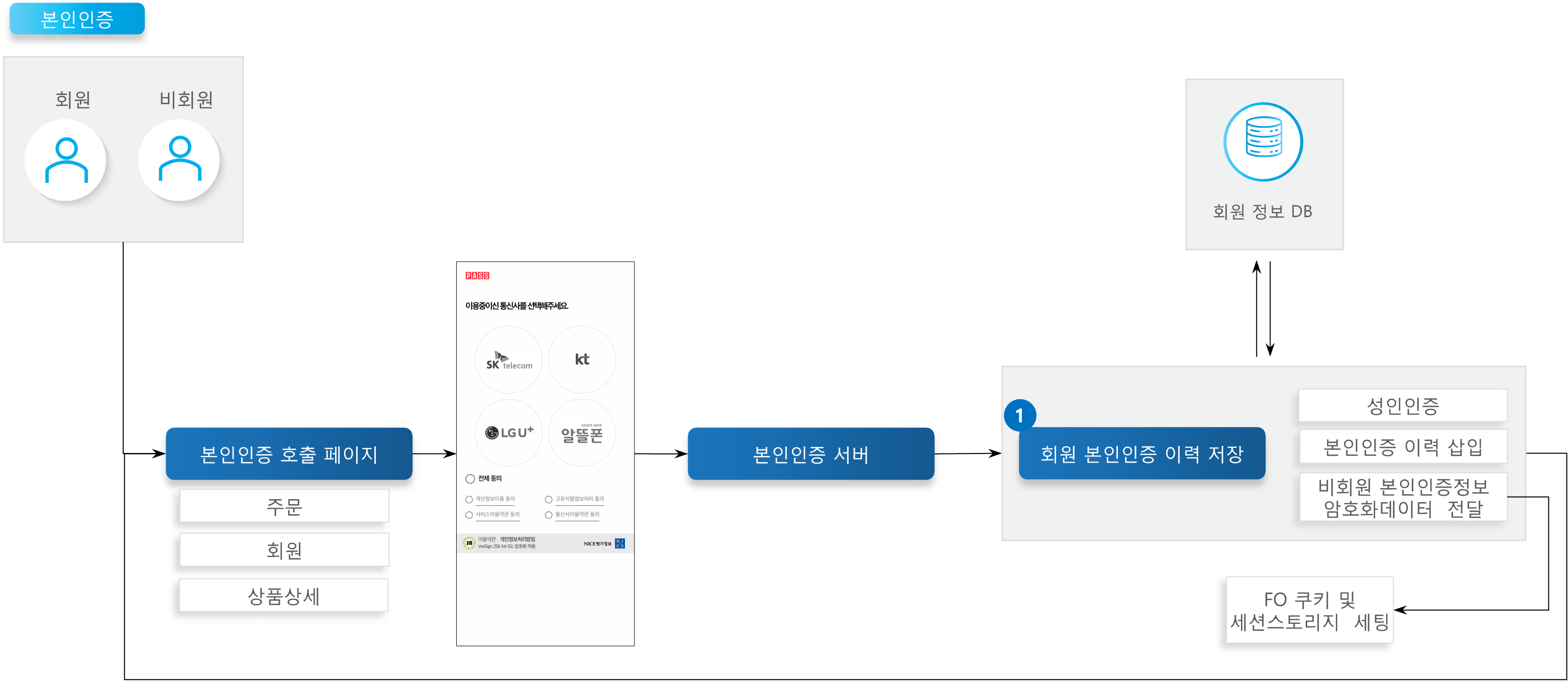
<figure><img src="https://2999922013-files.gitbook.io/~/files/v0/b/gitbook-x-prod.appspot.com/o/spaces%2FXTxKSWMmuxEkop1pvuwe%2Fuploads%2FkNRCEkcBrXSFJOOiiWwB%2F%E1%84%87%E1%85%A9%E1%86%AB%E1%84%8B%E1%85%B5%E1%86%AB%E1%84%8B%E1%85%B5%E1%86%AB%E1%84%8C%E1%85%B3%E1%86%BC.png?alt=media&#x26;token=008d2ccd-d98a-42d3-9a24-0cc7c3f4b0ee" alt=""><figcaption></figcaption></figure>

{% stepper %}
{% step %}

### Save Member Identity Verification History

Upon an identity verification request, a classification code is passed and the identity verification history is inserted. If an adult verification classification code is passed, the member's adult verification status is updated.
{% endstep %}
{% endstepper %}

## API Function List

<table><thead><tr><th width="96.77783203125">API</th><th width="390.666748046875">Description</th><th width="92.4444580078125">Server</th><th width="90.2222900390625">Method</th><th>Remarks</th></tr></thead><tbody><tr><td>Save Member Identity Verification History</td><td>After mobile identity verification, saves the result of the identity verification process carried out per module, and if the request classification code indicates an adult<br>verification request, updates the member's adult verification status.</td><td>Member</td><td>POST</td><td><a href="http://api.x2bee.com/content?msa=member&#x26;depth=%EB%B3%B8%EC%9D%B8%EC%9D%B8%EC%A6%9D&#x26;path=saveCertiInfo">🔗View API></a></td></tr></tbody></table>

## Definition of Terms

<table><thead><tr><th width="108.4443359375">Term</th><th>Description</th><th data-hidden>Remarks</th></tr></thead><tbody><tr><td>Identity Verification</td><td>Mobile identity verification allows the unique identifying information (CI) to be obtained.<br>This information can be used to confirm a member's identity, and helps protect personal information and enable secure transactions.</td><td></td></tr></tbody></table>

## Other Notes

* **Identity Verification**
  * Uses the NICE identity verification API.
  * The values received through identity verification are as follows.

<details open>

<summary>Values Passed by Identity Verification (Expand)</summary>

<table><thead><tr><th width="98.77783203125">Verification Result</th><th width="161.6666259765625">Name</th><th width="155.333251953125">Key</th><th>Remarks</th></tr></thead><tbody><tr><td><strong>Common</strong></td><td>CP Request Number</td><td>REQ_SEQ</td><td>Max 30 Bytes (generated/arbitrary value)</td></tr><tr><td></td><td>Verification Method</td><td>AUTH_TYPE</td><td>M: Mobile Phone C: Card X: Certificate<br>P: Samsung Pass</td></tr><tr><td><strong>Verification Success</strong></td><td>Result Unique Number</td><td>RES_SEQ</td><td>24 Bytes</td></tr><tr><td></td><td>Name</td><td>NAME</td><td>50 Bytes, EUC-KR</td></tr><tr><td></td><td>UTF-8 Name</td><td>UTF8_NAME</td><td>50 Bytes, UTF-8, requires URLDecode<br>processing</td></tr><tr><td></td><td>Date of Birth</td><td>BIRTHDATE</td><td>YYYYMMDD</td></tr><tr><td></td><td>Gender Code</td><td>GENDER</td><td>0: Female, 1: Male</td></tr><tr><td></td><td>Domestic/Foreign National Code</td><td>NATIONAINFO</td><td>0: Domestic National, 1: Foreign National</td></tr><tr><td></td><td>Duplicate Sign-Up Check Value (DI Value)</td><td>DI</td><td>64 Bytes, not returned for card-birthdate verification</td></tr><tr><td></td><td>Connecting Information Check Value (CI Value)</td><td>CI</td><td>88 Bytes, not returned for card-birthdate verification</td></tr><tr><td></td><td>Carrier Information</td><td>MOBILE_CO</td><td>3 Bytes, mobile phone verification only</td></tr><tr><td></td><td>Mobile Phone Number</td><td>MOBILE_NO</td><td>24 Bytes, mobile phone verification only</td></tr></tbody></table>

</details>

* **Non-Member Identity Verification**
  * Non-members can use the service after identity verification when purchasing a product.
  * When a non-member accesses the detail page of an adult-only product, they must go through the identity verification process and be 19 years of age or older to use the service.
  * During non-member identity verification, the age and adult verification status data are encrypted and set in a cookie.
  * During non-member identity verification, the customer name and phone number data are set in session storage.
* **Identity Verification Development Settings**

<table><thead><tr><th width="189">File</th><th>Setting/Description</th><th>Remarks</th></tr></thead><tbody><tr><td>niceid.js</td><td>Line 8: sSiteCode = site code<br>Line 9: sSitePW = site password. Windows OS users:<br>Uncomment line 16<br>Comment line 17. MAC OS users:<br>Comment line 16<br>Uncomment line 17</td><td>MAC OS users must change the permissions of the identity verification module.<br>e.g. from the venus-x2bee-mo-vanilla path, run $ sudo chmod 755 CPClient_mac, then run the CPClient_mac file once, and approve the 'Open App from Unidentified Developer' permission.</td></tr><tr><td>checkplus_success.js</td><td>Line 7: sSiteCode = site code<br>Line 8: sSitePW = site password. Windows OS users:<br>Uncomment line 13<br>Comment line 14. MAC OS users:<br>Comment line 13<br>Uncomment line 14</td><td>MAC OS users must change the permissions of the identity verification module.<br>e.g. from the venus-x2bee-mo-vanilla path, run $ sudo chmod 755 CPClient_mac, then run the CPClient_mac file once, and approve the 'Open App from Unidentified Developer' permission.</td></tr></tbody></table>

{% hint style="info" %}
MAC OS Permission Notice: You must change the execution permission of CPClient\_mac and approve the 'Open App from Unidentified Developer' permission the first time it runs.
{% endhint %}
