> For the complete documentation index, see [llms.txt](https://tech.x2bee.com/llms.txt). Markdown versions of documentation pages are available by appending `.md` to page URLs; this page is available as [Markdown](https://tech.x2bee.com/api-guide/api-guides-en/store-front/common/notification-message.md).

# Notification Message

Notification Message provides an important feature for guiding customers through completed processes for specific tasks performed on the shopping mall, or for delivering shopping mall information to them. Among the various notification message types, it supports efficient communication with customers through Alimtalk, SMS/LMS, and the Notification Box.

***

## Key Features

* **Various notification message types**
  * Provides various notification message types such as Alimtalk, SMS/LMS, and the Notification Box.
  * Each type is used appropriately for specific situations.
* **Notification message sending API**
  * When sending a notification message from another module, you can select and send Alimtalk, SMS/LMS, or the Notification Box using the template ID.
  * Flexible notification message sending is possible through a simple API call.
* **Template registration management**
  * Templates for notification messages can be registered and managed on the admin page.
  * Consistent notification messages are provided using the registered templates.
* **Long message handling (LMS)**
  * If the template content exceeds 90 bytes when sending an SMS, it is automatically sent as an LMS to deliver the message content in more detail.

## Process Definition

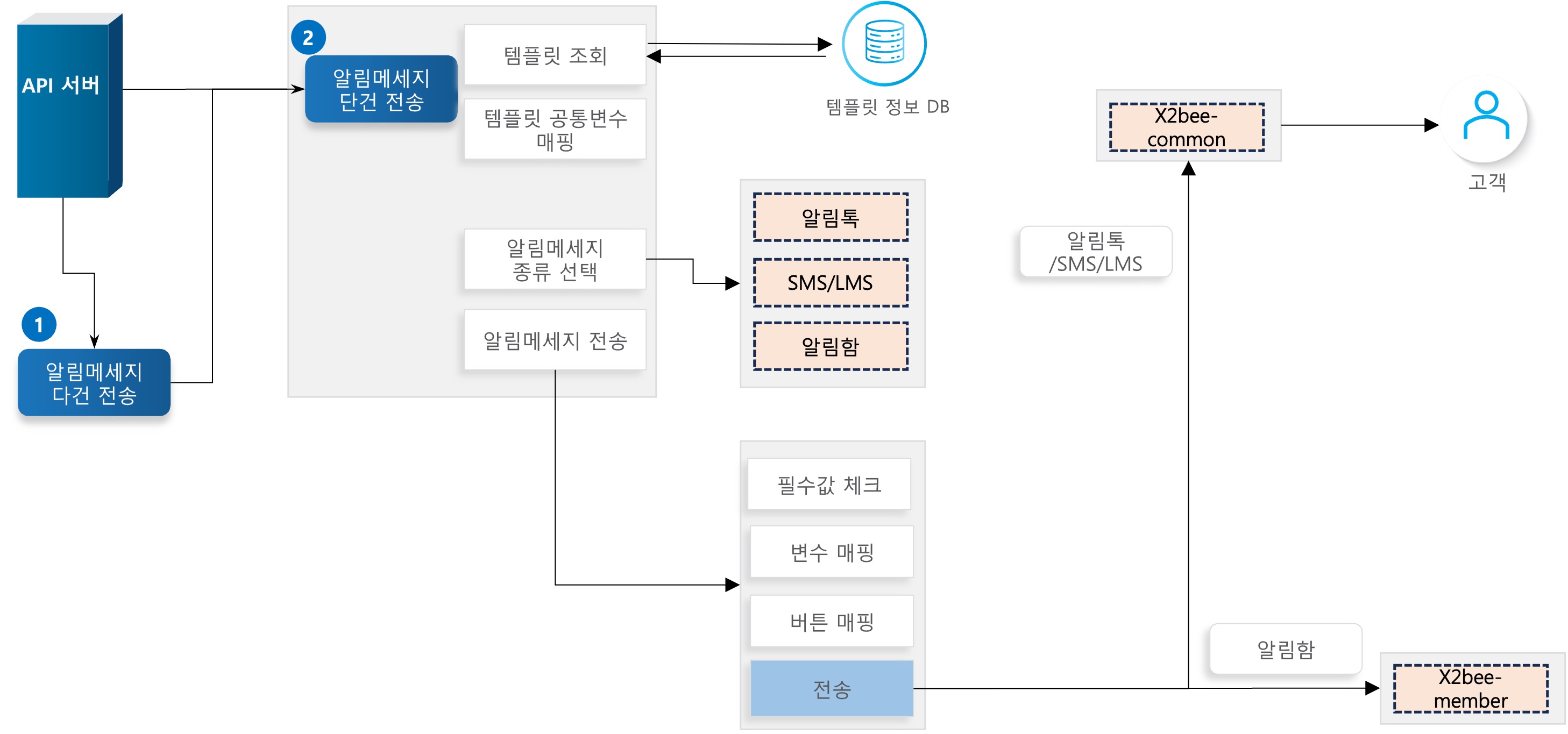
<figure><img src="https://2999922013-files.gitbook.io/~/files/v0/b/gitbook-x-prod.appspot.com/o/spaces%2FXTxKSWMmuxEkop1pvuwe%2Fuploads%2FUqpyrYe2k4sRkeKkvvXG%2F183566414.jpg?alt=media&#x26;token=30055bae-aaf5-4e46-82b6-c3488b4f5d1e" alt=""><figcaption></figcaption></figure>

{% stepper %}
{% step %}

### Send multiple notification messages

You can send multiple notification messages at once, regardless of notification message type.
{% endstep %}

{% step %}

### Send a single notification message

Sends a notification message.

* Looks up the template in the template information database. The template must be currently in use.
* If a template variable matches a code in the common code (ST010), it is mapped.
* Selects the sender that matches the template's default notification method code according to the common code (CH009).
* Sends the notification message.
  * Replaces the template content variables with the request parameters received.
  * If button information exists in the template information, replaces the button content.
  * When sending Alimtalk/SMS/LMS, calls x2bee-common; for the Notification Box, calls x2bee-member.
    {% endstep %}
    {% endstepper %}

## API Function List

| API                                 | Description                                                                   | Server | Method | Notes                                                                                                                              |
| ----------------------------------- | ----------------------------------------------------------------------------- | ------ | ------ | ---------------------------------------------------------------------------------------------------------------------------------- |
| Send multiple notification messages | Sends multiple notification messages regardless of notification message type. | Common | POST   | [🔗View API >](http://api.x2bee.com/content?msa=common\&depth=%EC%95%8C%EB%A6%BC%EB%A9%94%EC%8B%9C%EC%A7%80\&path=sendMessage)     |
| Send a single notification message  | Sends a single notification message.                                          | Common | POST   | [🔗View API >](http://api.x2bee.com/content?msa=common\&depth=%EC%95%8C%EB%A6%BC%EB%A9%94%EC%8B%9C%EC%A7%80\&path=sendMessageList) |

## Terminology

<table><thead><tr><th width="255">Term</th><th>Description</th></tr></thead><tbody><tr><td>SMS (Short Message Service)</td><td>One of the text message sending services provided by mobile carriers. Can send approximately 40 characters in Korean.</td></tr><tr><td>LMS (Long Message Service)</td><td>One of the text message sending services provided by mobile carriers. Can send approximately 500 characters in Korean.</td></tr><tr><td>Alimtalk</td><td>A service through which corporate customers send informational KakaoTalk messages to users.</td></tr></tbody></table>

## Other Notes

* When calling the notification message sending API from another module, you must inherit the **MessageCommonDto** of x2bee-common and pass in the required values when calling.
  * Required values for Alimtalk: template ID, recipient number
  * Required values for SMS/LMS: template ID, recipient number
  * Required values for the Notification Box: template ID, member number
* Sending is only possible if there is a template in use that matches the given template ID.
* If a code value corresponding to common code ST010 (site miscellaneous information) exists in a variable in the template content, it is automatically mapped. (No need to include it in the request parameters.)
* The message is sent using the method corresponding to common code CH009 (default notification method code) that matches the template information's default notification method code.
* The X2bee-common project is called to map the request parameter DTO to the template content.
* When sending Alimtalk or SMS/LMS, the x2bee-common project is called; when registering to the Notification Box, the x2bee-member project is called.
* If you want to save sending information when sending Alimtalk or SMS/LMS, you can do so by entering data in reference values 1–5 (ref1Val \~ ref5Val).
* After sending Alimtalk or SMS/LMS, you can check the history in the ST\_NAVER\_TMS\_SND\_HIST and ST\_NAVER\_SMS\_SND\_HIST tables, respectively.
