> For the complete documentation index, see [llms.txt](https://tech.x2bee.com/llms.txt). Markdown versions of documentation pages are available by appending `.md` to page URLs; this page is available as [Markdown](https://tech.x2bee.com/api-guide/api-guides-en/store-front-api/order-and-payment/cart.md).
# Cart
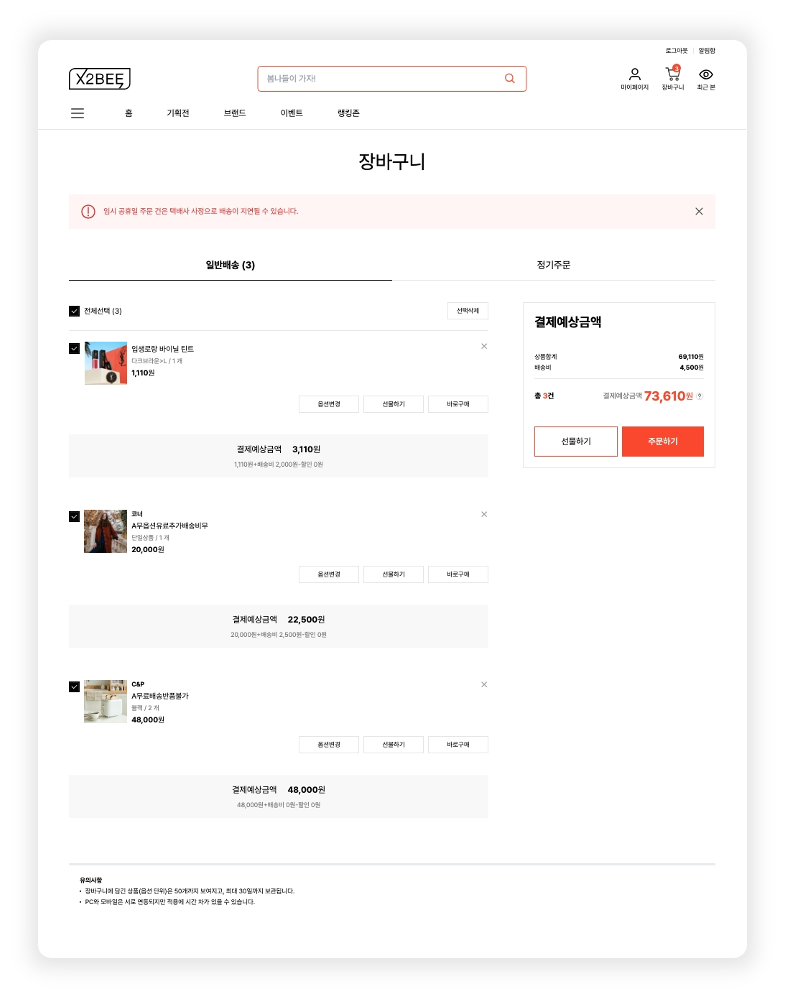
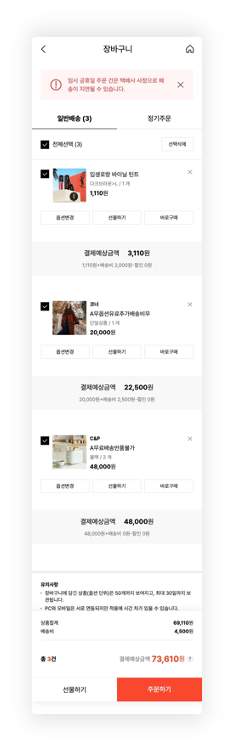
Manages the feature that lets users select products and add them to the cart, and is an essential element for beginning the order process.
Provides APIs so users can manage the products they want to order by adding, editing, and removing selected products in the cart.
{% columns %}
{% column %}
### 1. Look Up Cart
Looks up the list of products added to the cart.
1\) Member: looks up the cart by member number.
2\) Non-member: for non-members, a session number is generated when the cart is first created and stored in a cookie, and the cart is subsequently looked up using the session number retrieved from the cookie.
* **Look up cart** ([🔗View API >](https://api.x2bee.com/content?msa=order\&depth=%EC%9E%A5%EB%B0%94%EA%B5%AC%EB%8B%88\&path=getBasket))\
Looks up by member number or the non-member's cookie session number and outputs the composition information.
```
GET /v1/basket/getBasket
```
### 2. Look Up Customer Notification List
Looks up the top notice registered in the BO system's **Notice Management > Customer Notification Management** that appears at the top.
* **Look up screen customer notification (**[🔗View API >](https://api.x2bee.com/content?msa=common\&depth=%EA%B3%B5%ED%86%B5\&path=getContsList))\
Looks up the customer notification list.
```
GET /v1/common/getContsList
```
### 3. Look Up Interest-Free Installment Information List
Clicking the text at the bottom of the cart calls and displays the promotion information registered in Interest-Free Installment Information management.
* **Look up interest-free installment information list (**[🔗View API >](https://api.x2bee.com/content?msa=order\&depth=%EA%B2%B0%EC%A0%9C%EC%A0%95%EB%B3%B4/getInterestFreeList))\
Looks up the interest-free installment information list for credit cards, etc.
```
GET /v1/payment/getInterestFreeList
```
***
## Remove from Cart

### 1. Remove from Cart
Removes a sold-out or selected product from the cart list screen.
* **Remove from cart (**[🔗View API >](https://api.x2bee.com/content?msa=order\&depth=%EC%9E%A5%EB%B0%94%EA%B5%AC%EB%8B%88\&path=deleteBasket))\
Removes the selected product from the cart product list.
```
PUT /v1/basket/deleteBasket
```
***
## Change Cart Option

### 1. Change Cart Option
Selecting the target product in the cart and clicking 'Change Option' shows the option and quantity change popup. Change the quantity and click \[Confirm Selection] to save the changed quantity.
* **Change cart option (**[🔗View API >](https://api.x2bee.com/content?msa=order\&depth=%EC%9E%A5%EB%B0%94%EA%B5%AC%EB%8B%88\&path=optionChangeBasket))\
Calls the cart product option change API when the 'Confirm Selection' button is clicked.
```
PUT /v1/basket/optionChange
```
***
## Product Detail Gift Promotion List

### 1. Product Detail Gift Promotion List
A screen that looks up and displays the list of gift promotion information present in the detail information for products in the cart list. Clicking the gift area looks up the gift promotion information and calls a modal.
* **Product detail gift promotion list (**[🔗View API >](https://api.x2bee.com/content?msa=order\&depth=%ED%94%84%EB%A1%9C%EB%AA%A8%EC%85%98%20%EC%82%AC%EC%9D%80%ED%96%89%EC%82%AC/getAeEvtList_2))\
A members-only API that does not apply to non-members.
```
POST/v1/marketing/aeEvtList
```
***
## Order Eligibility Validation

### 1. Cart Product Order Validation
Runs validation before entering the order form. On 'success', moves to the order form; on 'failure', shows a failure message.
* **Check whether cart products can be ordered (**[🔗View API >](https://api.x2bee.com/content?msa=order\&depth=%EC%9E%A5%EB%B0%94%EA%B5%AC%EB%8B%88\&path=validateBasket))\
An API that checks whether the selected products can be ordered, when 'Buy Now' or 'Order' is clicked in the cart.
```
POST /v1/basket/validateBasket
```
***
## Merge Cart

### 1. Merge Cart
When a member logs in, combines the products previously added to the cart as a non-member with the existing member's cart products and displays them.
* **Merge cart (**[🔗View API >](https://api.x2bee.com/content?msa=order\&depth=%EC%9E%A5%EB%B0%94%EA%B5%AC%EB%8B%88\&path=combineBsket))\
Treats the non-member cart data as the most recent data, so the non-member data appears first at the top of the cart when sorted.
```
POST /v1/basket/combineBasket
```