> For the complete documentation index, see [llms.txt](https://tech.x2bee.com/llms.txt). Markdown versions of documentation pages are available by appending `.md` to page URLs; this page is available as [Markdown](https://tech.x2bee.com/api-guide/api-guides-en/store-front-api/my-page/my-page-main.md).
# My Page Main
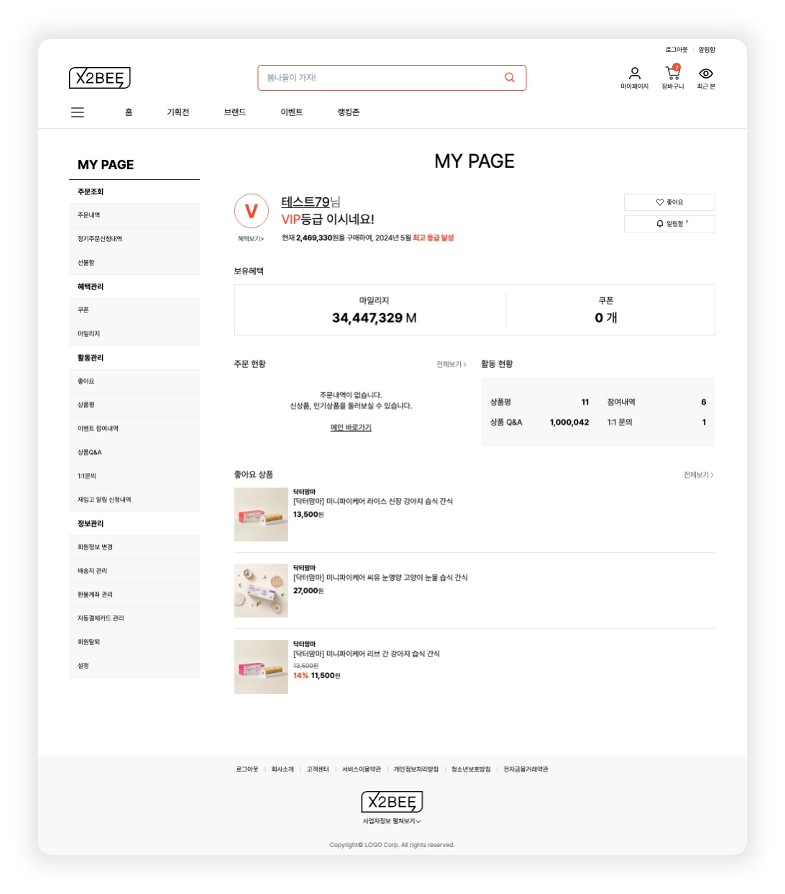
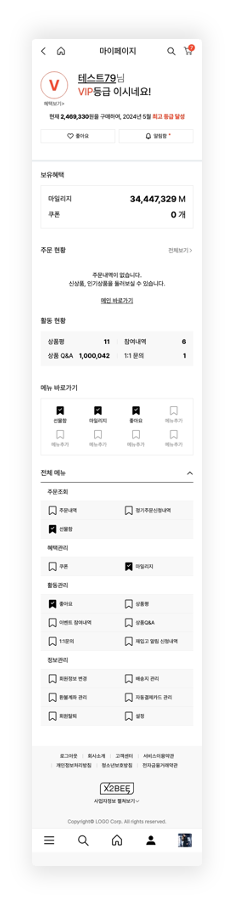
My Page is a page that brings together various features for customer convenience in one place, playing an important role in enhancing the user's shopping experience. Each sub-feature provides the information and services customers need, allowing them to be managed and used conveniently.
{% columns %}
{% column %}
PC
{% endcolumn %}
{% column %}
Mobile
{% endcolumn %}
{% endcolumns %}
***
## My Page
### 1. View Member Information
You can view the profile, benefits held, and activity status (participation history, product Q\&A, 1:1 inquiries) of the logged-in customer.
* **View My Page Main Information (**[🔗View API >](https://api.x2bee.com/content?msa=member\&depth=%EB%A7%88%EC%9D%B4%ED%8E%98%EC%9D%B4%EC%A7%80\&path=myPageMain))\
Retrieves the member's My Page main information.
```
GET /v1/myPage/myPageMain
```
### 2. View Member Grade
In the member grade area, you can check the member's current grade and information for upgrading to a higher grade.
* **View Member's Higher Grade(**[🔗View API >](https://api.x2bee.com/content?msa=member\&depth=%EB%A7%88%EC%9D%B4%ED%8E%98%EC%9D%B4%EC%A7%80\&path=getHighGradeInfo))\
Checks the member's token value to obtain the current grade and higher grade information.
```
GET /v1/myPage/highGradeInfo
```
### 3. View Order Status
In the order status area, you can check quantity information for the member's orders/shipments and cancellations/exchanges/returns.
* **View Order/Delivery Claim Count (**[🔗View API >](https://api.x2bee.com/content?msa=order\&depth=%ED%9A%8C%EC%9B%90%EC%A0%9C%EA%B3%B5/getMemberOrderClaimCnt))\
Obtains the count from order completed through delivery completed, plus the total count of cancellations, returns, and exchanges.
```
POST /v1/member/getOrdClaimCnt
```
### 4. View Product Reviews
Within the activity status area, you can check the number of products, among those purchased by the member, for which a product review can be written.
* **View Number of Products Eligible for Review (**[🔗View API >](https://api.x2bee.com/content?msa=order\&depth=%EC%83%81%ED%92%88%EC%A0%9C%EA%B3%B5/getReviewWritePossibleCount))\
Retrieves the number of ordered products for which the member can write a review.
```
POST /v1/review/revWritePsbCnt
```
### 5. Register/Delete Menu Favorites
You can register or delete a favorite by clicking the favorites icon in the full menu.
Registered menus are displayed with an icon added to the top menu shortcut area.
For the screen inquiry API for the full menu list, please refer to 1. View Member Information in this document.
* **Update Member Favorites (**[🔗View API >](https://api.x2bee.com/content?msa=member\&depth=%ED%9A%8C%EC%9B%90%EA%B4%80%EB%A6%AC/bkmkMenu))\
Receives the menu ID and a type value indicating registration or deletion, and processes favorite registration/deletion.
```
POST/v1/myPage/bkmkMenu
```
### 6. View Employee Discount Limit
If a company's employees are customers using the shopping mall, an employee discount service can be provided.
You can set the discount limit for employees and expose the remaining discount/limit information on My Page so it can be viewed.
* **View Employee Discount Limit (** [🔗View API >](https://api.x2bee.com/content?msa=member\&depth=%EB%A7%88%EC%9D%B4%ED%8E%98%EC%9D%B4%EC%A7%80/getDsctLmtStat))\
Checks the member's token value to look up the member's employee discount limit.
```
GET v1/staff/getDsctLmtStat
```
## View Notification Box
Clicking the \[Notification] icon on My Page takes you to the Notification Box page.
### 1. View Notifications
You can view a list of notification history for the logged-in customer.
* **View Notification Box (**[🔗View API >](https://api.x2bee.com/content?msa=member\&depth=%EC%95%8C%EB%A6%BC%ED%95%A8/getNotiBoxList))\
Retrieves the member's notification box list.
```
GET /v1/notibox/notiInfo
```
## View Member Grade Benefits
Clicking \[View Benefits] on My Page takes you to my member grade page.
### 1. View Member Grade
Displays the customer's name and employee status.
* **View Member Information (Unmasked) (**[🔗View API >](https://api.x2bee.com/content?msa=member\&depth=%ED%9A%8C%EC%9B%90%EA%B3%B5%ED%86%B5/getMemberInfo_1))\
Retrieves unmasked member information.
```
GET /v1/front/memberInfo
```
### 2. View Member's Higher Grade
You can view the member's current grade and higher grade.
For this API, please refer to 2. View Member Grade in the My Page - Inquiry Area document.